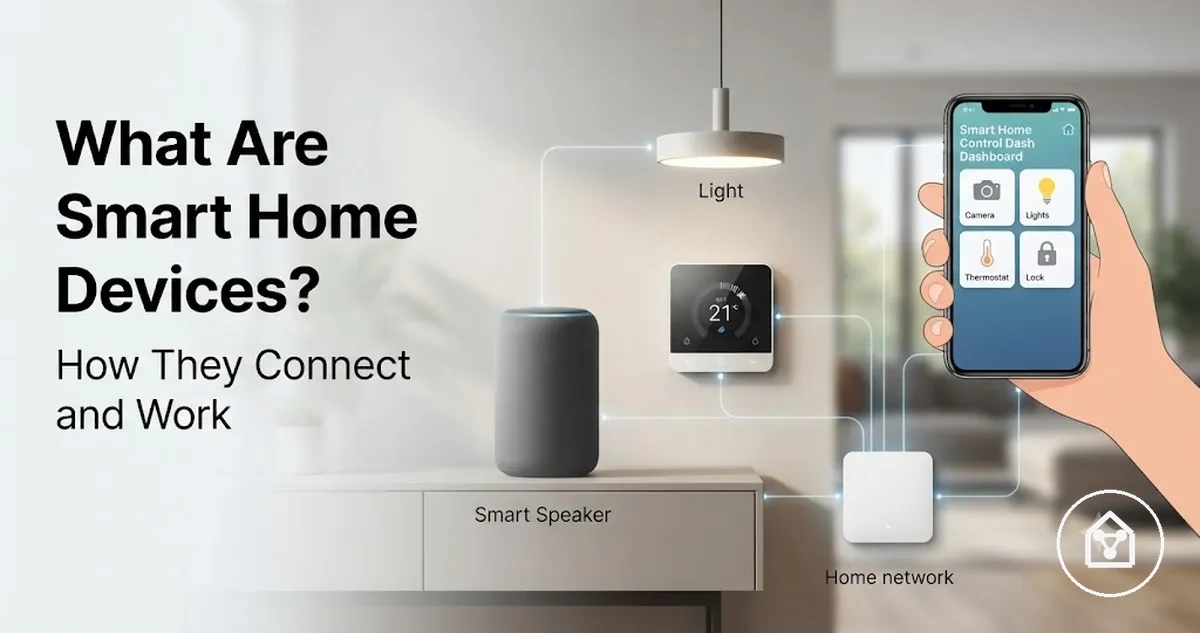
Smart home devices and how they work
Smart home devices are connected devices that can sense, communicate, or respond within a home environment through sensors, a control interface, a home network, and device response mechanisms. They are connected home devices that can use app control, automation, a controller, or a hub to provide functions beyond a standard electrical device.
Smart home devices work by transferring information between the device, the user interface, and the connected network path.
Smart home devices work by transferring information between the device, the user interface, and the connected network path. A sensor can detect a trigger, an app or controller can send a command, and the device response can occur through a wireless connection based on the device type, platform, and home configuration.
For example, a smart light can receive an app command and change its lighting state through a connected network.
For example, a smart light can receive an app command and change its lighting state through a connected network. The same category can include sensors, plugs, cameras, and thermostats, but the exact functions depend on the device design, supported connections, and available automation features.
Table of Contents
What smart home devices are
Smart home devices are connected devices used to monitor, control, automate, or respond to conditions inside a home. They combine a device function, a connection method, and a control method to support a specific home function and user outcome.
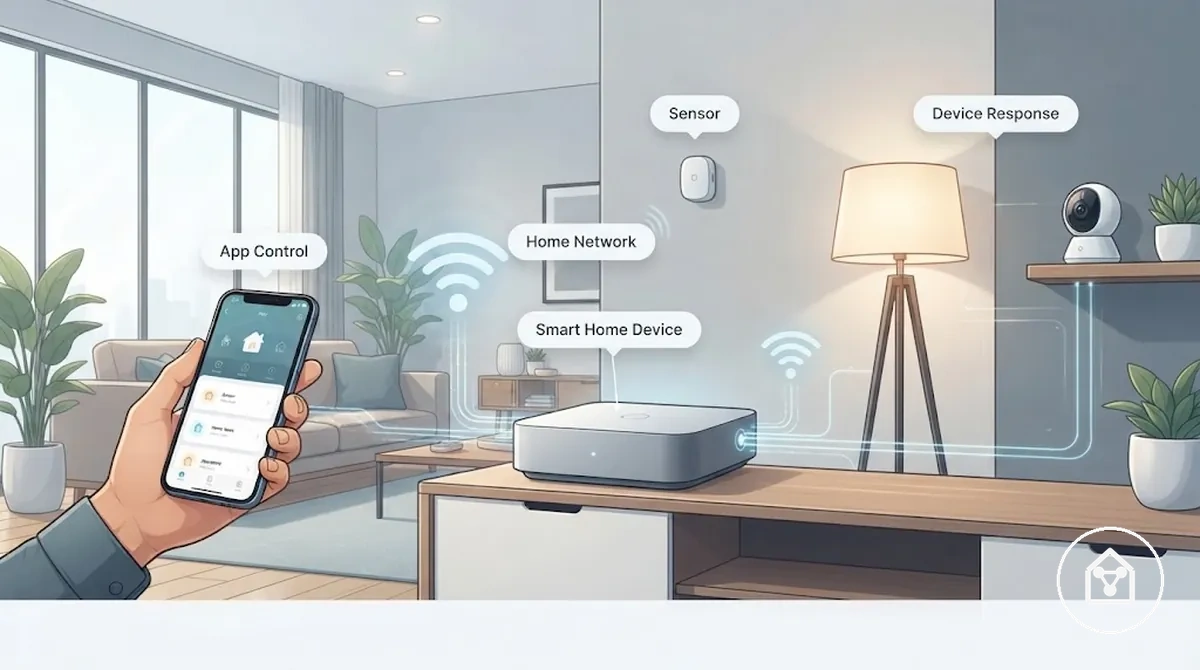
Smart home devices can use sensors to collect information, an app or controller to send commands, and a network connection to communicate with other parts of a connected home system. The level of automation or response depends on the device type, supported platform, and available features.
The level of automation or response depends on the device type, supported platform, and available features.
For example, a smart door sensor can monitor whether a door state changes and send status information through a connected app. The sensor provides monitoring, while the app or controller can allow the user to view the condition or create an automated response when the system supports that function.
What makes a home device smart
A home device is considered smart when connectivity and controllable response add functions beyond a standard home device. Smart devices use attributes such as sensing, programmability, or app-based control to monitor conditions, receive commands, or create responses when supported by the device and platform.
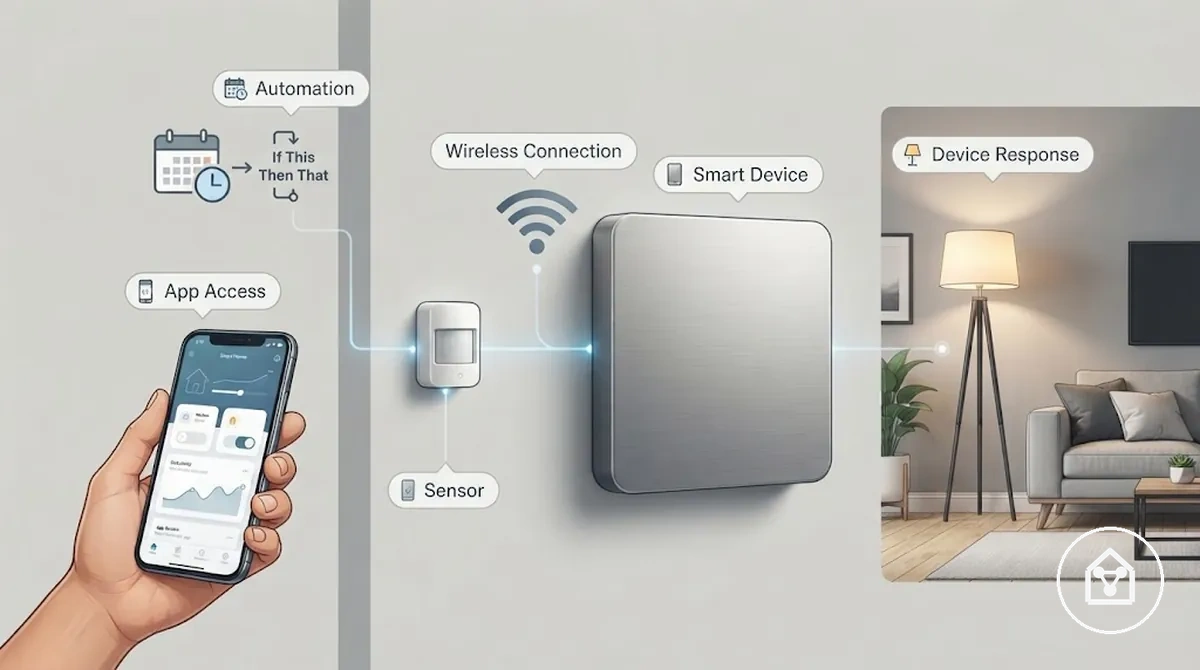
The attributes that create smart behaviour differ by device type and supported system. A device may include some capabilities without supporting every form of control, automation, or communication.
- Sensing: Sensors detect conditions such as movement, temperature, or status changes and provide information that can trigger a response.
- Connectivity: A wireless connection allows a device to communicate with an app, controller, or network when the supported connection method is available.
- Programmability: Schedules and routines allow supported devices to perform actions based on defined conditions or commands.
- Remote control: App access allows users to send commands or view device status through a connected control method.
- Voice control and automation: Some devices support voice commands or automated responses through compatible assistants and platforms.
Connectivity alone does not make every connected device functionally smart. For example, a device with only a basic remote signal has a different level of response than a device that can sense conditions, communicate status, and react through automation.
What smart home devices are not
Smart home devices are not defined only by being electric, connected, or remotely controlled. An ordinary appliance can use electricity, and a remote-controlled device can receive commands, but these capabilities alone do not necessarily provide the automation, integration, or response functions associated with a smart device.
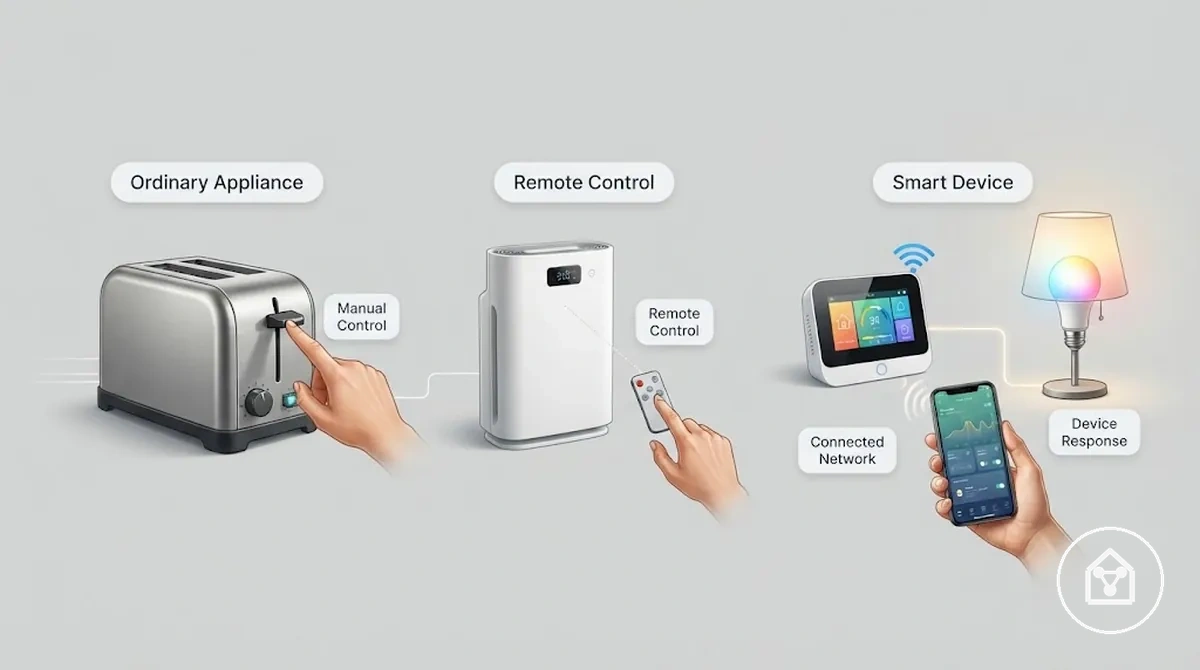
The boundary depends on the device capability and supported system. A connected device may provide a single control function, while a smart device can combine connectivity with features such as app control, status information, or automation when those capabilities are supported.
| Device type | Control | Connection | Response |
|---|---|---|---|
| Ordinary appliance | Manual control | Electrical power | Direct operation without connected automation |
| Remote-controlled device | Remote command | Remote signal | Response limited to the available control function |
| Smart device | App control or automation | Connected network or platform | Response based on supported capabilities and conditions |
For example, a basic timer plug can switch power according to a schedule, while an app-controlled smart plug can provide connected status information and automation features when the supported system allows those functions. The difference is the level of connected capability rather than whether the device uses electricity.
How smart home devices work in a connected home
Smart home devices work by sending data or commands between a device, a control interface, and a home network or hub. The control path allows a sensor event or user input to become a device response through supported communication and processing methods.
Smart home devices work by sending data or commands between a device, a control interface, and a home network or hub.
Smart home devices use a connected process where the device collects information, the app or controller manages commands, and the network or hub transfers signals between system components. Local control or cloud control can process these commands depending on the device design, platform, and supported connection method.
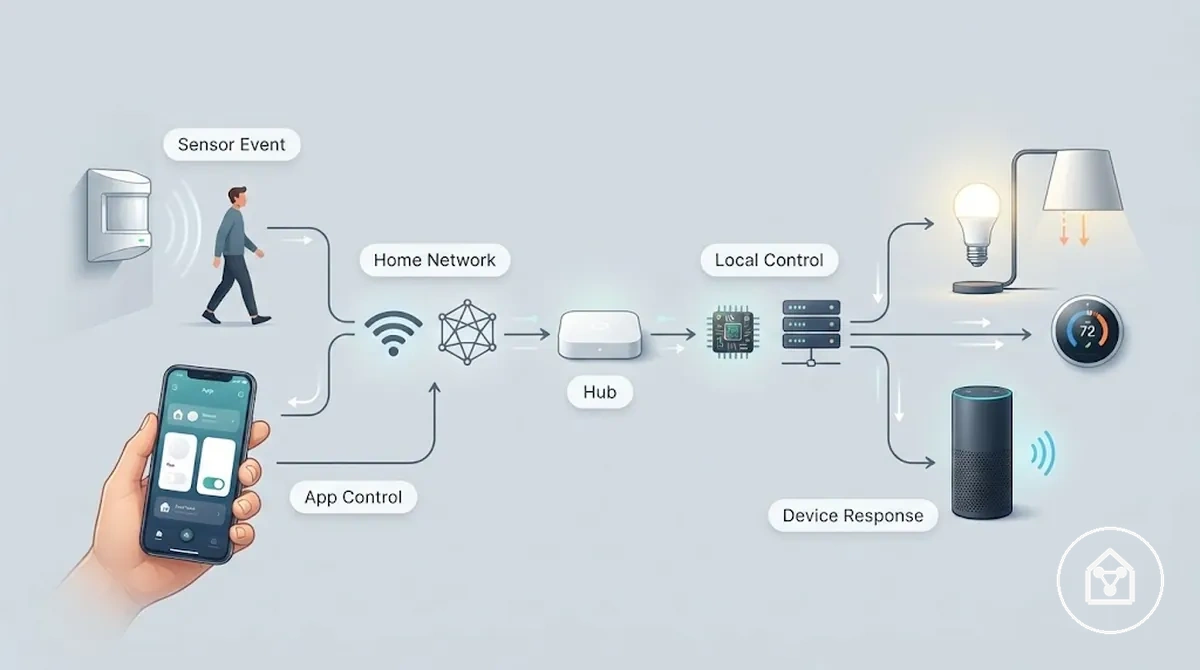
How smart home devices work in a connected home can be understood as a flow from an event or command to a response. The flow shows the relationship between input, control, communication, processing, and status feedback.
- Sensor event or user input: A device sensor detects a condition, or a user provides a command through a connected interface.
- App or controller: The app or controller receives input, sends commands, or displays device status information.
- Network or hub: The home network or hub transfers signals between connected devices and control components.
- Cloud or local control: Processing occurs through cloud control or local control depending on the device design and platform support.
- Device response and status: The device performs a supported action and can return status information to the user or connected system.
For example, a motion sensor can detect movement and send a signal through a connected system, allowing a compatible light to respond when the required automation conditions are supported. The exact control path depends on the device, platform, network configuration, and processing method.
Device, app, network, and control path
The control path is the chain that connects user input or a device event to a smart home device response. The device, app, network, and controller each have a role in moving commands, returning status information, and enabling connected control.
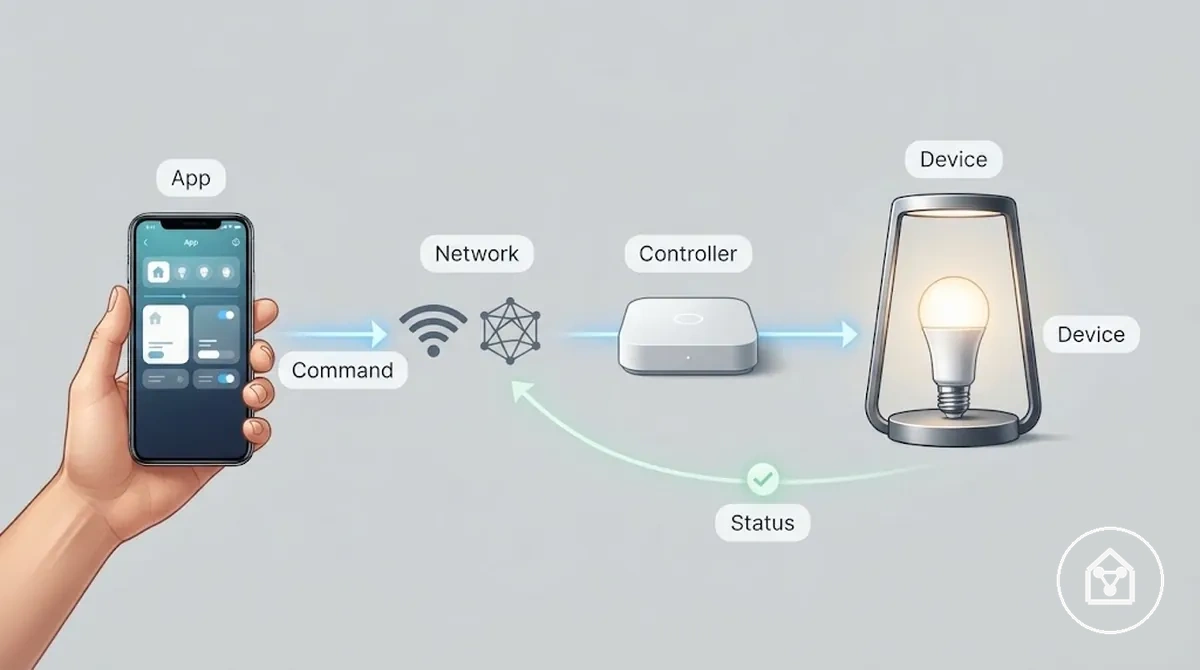
The device receives commands or detects conditions, the app provides a control interface, and the network transfers information between connected parts. A controller or hub can coordinate communication when supported, while feedback status allows the system to return information about the device state.
| Part | Role in the control path | Possible condition | Effect on response |
|---|---|---|---|
| Device | Receives commands or detects conditions. | Available functions and current device state | Determines the action the device can perform. |
| App | Provides user input and displays device information. | Requires supported device and platform access | Allows commands to be sent and status to be viewed. |
| Network | Transfers signals between connected components. | Connection method and system conditions | Allows information to move through the control path. |
| Controller or hub | Coordinates communication between supported devices. | Depends on device design and connected ecosystem | Helps route commands or connected actions. |
| Feedback status | Returns information about the device condition. | Available when the device supports status reporting | Provides confirmation of the device state. |
For example, a smart plug can receive a command from an app, send the instruction through the supported control path, and return a power status update when feedback is available. The exact response behaviour depends on the device design, platform, and connected system conditions.
Remote control, monitoring, and automation signals
Smart home devices use signals to translate user commands or detected conditions into device actions. A command, sensor event, or schedule can act as a trigger that produces a response when the device supports the required capability.
The signal type determines how a smart home device reacts.
The signal type determines how a smart home device reacts. Monitoring can provide status updates without automation, while routines or automation rules can connect a trigger condition with an action when supported by the device, platform, or controller.
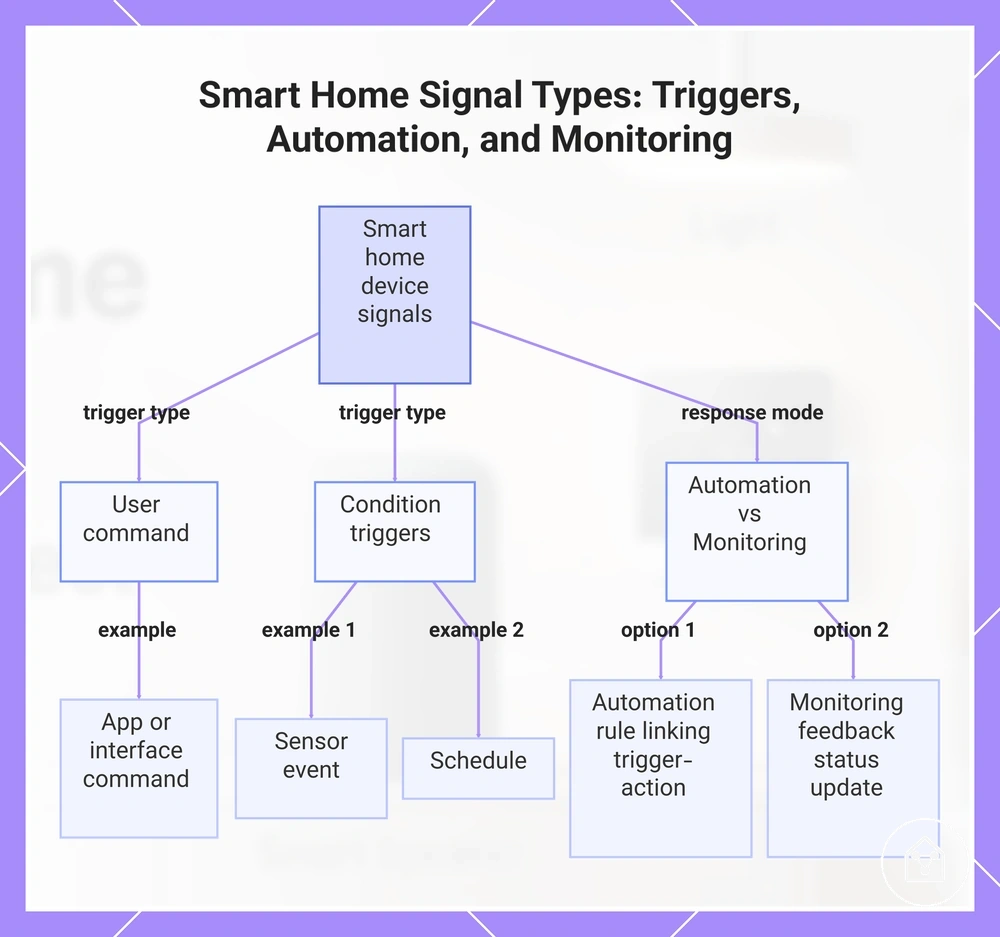
- User command: A command from an app or control interface can start an action, such as changing a supported device state.
- Sensor event: A detected condition can act as a trigger, allowing a supported device to respond to a change in its environment.
- Schedule: A time-based condition can start an action at a defined time when scheduled operation is supported.
- Routine or automation rule: A rule can link a trigger and an action, such as responding to a condition through a supported automation feature.
- Device status update: A device can return status information or a notification when monitoring and feedback features are available.
For example, a sensor event can trigger a compatible light response when an automation rule is supported. The exact action depends on the device capability, connected platform, and whether the required monitoring or automation function is available.
For example, a sensor event can trigger a compatible light response when an automation rule is supported.
This chart shows the main signal types in smart home systems—user commands, condition triggers, and the two response modes (automation and monitoring)—and how they produce device actions.
Core components of smart home devices
Smart home device components are the parts that enable sensing, control, communication, and response. Each component has a specific role, while the combination of physical and software layers can differ between devices.
Smart home device components are the parts that enable sensing, control, communication, and response.
The main components include physical device parts, sensors or actuators, processing elements, power sources, communication modules, and control services. Some smart home devices use local service processing, while others use cloud service features depending on their design and supported platform.
| Component | What it does | Where it may appear | Why it matters |
|---|---|---|---|
| Physical device | Provides the main function and contains the connected parts. | Device layer and physical structure | Creates the action or monitoring capability of the smart home device. |
| Sensor or actuator | A sensor detects conditions, while an actuator performs actions such as switching or movement. | Hardware layer inside the device | Allows the device to detect events or create a response. |
| Processor | Processes information and manages device operations. | Device control layer | Helps interpret inputs and coordinate supported functions. |
| Power source | Provides energy for device operation through options such as battery or mains power. | Device power layer | Allows the device to run and maintain supported functions. |
| Wireless module | Handles communication between the device and connected systems. | Communication layer | Allows information exchange through a supported connection method. |
| App | Provides a software interface for commands and status information. | User-facing software layer | Allows users to interact with supported device functions. |
| Controller or hub | Coordinates communication between supported connected devices. | Control layer within supported systems | Helps manage connected actions when available. |
| Cloud or local service | Provides additional processing or connected features outside the device. | Cloud service or local service environment | Supports functions based on device design and platform conditions. |
For example, a sensor can detect motion and provide information to a device system, while an actuator can switch a connected function when that response is supported. Each component contributes a specific role rather than defining the entire smart home device alone.
Sensors, switches, plugs, cameras, lights, and thermostats
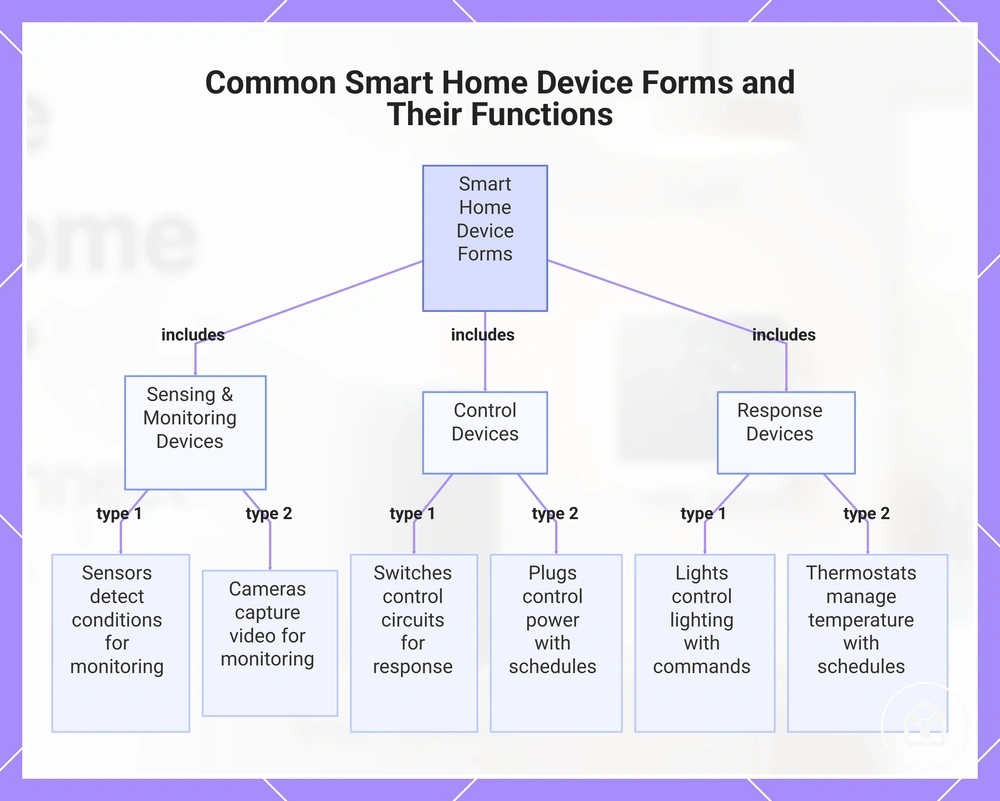
Sensors, switches, plugs, cameras, lights, and thermostats are common device forms that demonstrate different smart home functions. Each form has a core attribute related to sensing, control, monitoring, or response, which can produce a typical outcome when supported by the device and system.
- Sensors: Sensors detect conditions such as movement or environmental changes, which can support monitoring, alerts, or actions when available.
- Switches: Switches control connected electrical functions by changing a circuit state, which can enable a supported response.
- Plugs: Plugs control power delivery for connected devices and can support schedules or status updates when those features are available.
- Cameras: Cameras provide monitoring by capturing information and can support viewing or notifications when supported by the device.
- Lights: Lights control lighting functions and can respond to commands, schedules, or automation signals when those capabilities are available.
- Thermostats: Thermostats manage temperature settings and can support schedules or temperature-based actions when supported by the system.
This chart shows the main categories of smart home devices, their core functions, and typical outcomes.
Controllers, hubs, apps, and voice assistants
Controllers, hubs, apps, and voice assistants are control-layer entities that coordinate commands between users and smart home devices. Each one has a different role in the control interface, including sending commands, supporting automation coordination, translating communication methods, or enabling remote access through a supported ecosystem.
| Control layer | Main role | When it matters | Boundary note |
|---|---|---|---|
| App | Provides a control interface for commands and device status information. | Used when users interact with supported smart home devices through software. | The app controls a device but is not the controlled device. |
| Controller | Manages commands between users, connected devices, and supported services. | Useful when a system uses a dedicated control layer. | The controller role depends on device design and ecosystem structure. |
| Hub | Acts as a bridge that can coordinate connected devices and support protocol translation. | Relevant when devices use a coordinating layer for communication or automation. | A separate hub is not required for every smart home device. |
| Voice assistant | Provides voice-based commands through a compatible control interface. | Used when supported devices can respond to voice input. | A voice assistant can control a smart device without being the device being controlled. |
Remote access and automation coordination can depend on the ecosystem, platform, and available services. A hub or controller may coordinate actions locally, while other systems may use cloud services for supported features.
Wireless connections used by smart home devices
Wireless connections are the communication layer that allows smart home devices to exchange commands, status information, and automation signals. The connection type affects how devices communicate, including factors such as range, power use, hub dependency, and compatibility with supported platforms.
Smart home devices can use different connection types depending on their design and ecosystem.
Smart home devices can use different connection types depending on their design and ecosystem. Wi-Fi, Bluetooth, Zigbee, Z-Wave, and Matter provide different communication approaches, while conditions such as router placement, walls, distance, hub support, and platform support can influence range, responsiveness, and compatibility.
| Connection type | Common role | Hub need | Practical limitation |
|---|---|---|---|
| Wi-Fi | Connects devices to a home network for communication and remote access. | Often operates without a separate hub when supported by the device. | Range and reliability can be affected by router coverage, distance, and physical obstacles. |
| Bluetooth | Provides short-range communication for direct device control. | May not require a separate hub for direct connections. | Shorter range can limit communication distance between devices. |
| Zigbee | Supports low-power communication between connected smart home devices. | Often uses a compatible hub or controller. | Operation depends on supported devices and network structure. |
| Z-Wave | Provides a wireless connection method for supported smart home devices. | Typically uses a compatible hub or controller. | Compatibility depends on device support and ecosystem conditions. |
| Matter | Provides a communication layer designed to support compatibility across supported platforms. | Hub or controller requirements depend on device and platform support. | Available functions depend on supported devices and ecosystems. |
Wireless connection types affect how smart home devices fit into a system, but the practical result depends on the device model, network environment, and platform support. For more detail on how these connections relate to hubs and connected systems, see connectivity and hub basics.
Wi-Fi, Bluetooth, Zigbee, Z-Wave, and Matter
Wi-Fi, Bluetooth, Zigbee, Z-Wave, and Matter are connection options and compatibility layers used by smart home devices to exchange information. Each option has different practical effects related to typical use, hub need, range patterns, and common limitations.
| Option | Attribute | Value or condition | Effect on use |
|---|---|---|---|
| Wi-Fi | Typical use | Connects smart home devices through a router and home network. | Supports communication and internet-connected features when the device and platform support them. |
| Bluetooth | Range pattern | Short-range pairing and local device communication. | Works for nearby control but distance can limit communication. |
| Zigbee | Hub need | Often uses a compatible hub or controller for connected device communication. | Can support low-power smart home networks when supported by the device system. |
| Z-Wave | Hub need | Typically uses a compatible hub or controller within a smart home network. | Operation depends on supported devices and platform conditions. |
| Matter | Compatibility layer | Supports interoperability between compatible platforms and devices. | Helps supported devices work across ecosystems but is not a device category itself. |
When a smart home hub is needed
A smart home hub is needed when a device or ecosystem requires a bridge for communication, protocol translation, automation coordination, or central control. Many smart home devices can work without a separate hub, but a hub may be required when the device protocol, platform, or desired features need an additional control layer.
A wireless device can still need a hub when its device protocol requires a bridge to communicate with other smart home devices.
A wireless device can still need a hub when its device protocol requires a bridge to communicate with other smart home devices. For example, a device using a hub-dependent protocol may rely on a hub for protocol translation and coordination, while many Wi-Fi or Bluetooth devices can provide direct control through their supported platform.
A smart home hub may be needed when:
- Device protocol: The device protocol requires a bridge or gateway to connect the device with the wider smart home system.
- Ecosystem: The ecosystem requires a compatible hub to coordinate devices, commands, and status information.
- Local automation: Local automation needs a central layer to coordinate routines, responses, or communication between devices.
- Device count: A larger group of connected devices may benefit from a central control layer for organisation and coordination.
- Reliability: A hub may provide a consistent communication layer when the chosen system uses hub-based coordination.
- Remote control: Remote control features may require a hub, app, network connection, or supported service depending on the device design.
Common examples of smart home devices
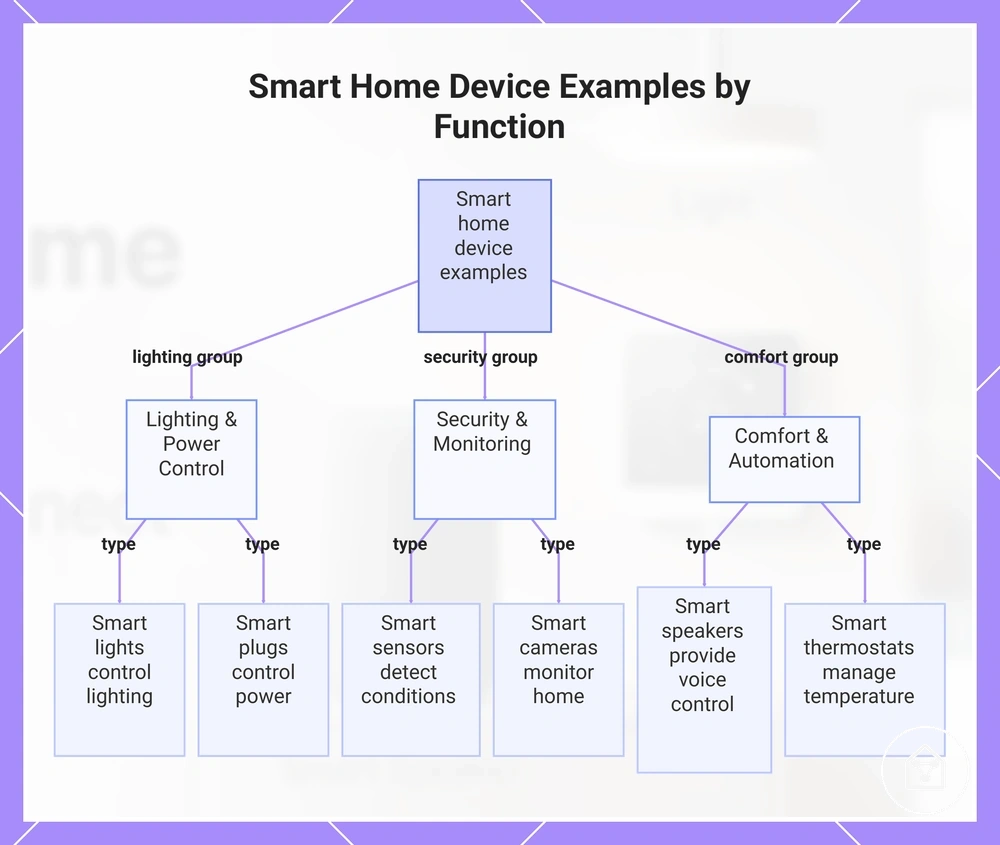
Smart home device examples can be grouped by home function, showing how different device forms support areas such as lighting, security, comfort, and control. These examples help identify the category by connecting each device form with a typical smart capability.
These are representative examples rather than a complete list of every smart home device.
These are representative examples rather than a complete list of every smart home device. The purpose is to recognize common device forms before exploring specific types in more detail.
- Lighting: Smart lights support home lighting control and can provide features such as schedules or routines when supported.
- Plugs: Smart plugs control power for connected devices and can provide remote control or status information when available.
- Sensors: Smart sensors detect conditions such as movement and can support alerts or automation actions when configured.
- Cameras: Smart cameras support home monitoring and can provide viewing or notification features when supported.
- Locks: Smart locks control access points and can support connected access functions through compatible systems.
- Speakers: Smart speakers provide a voice control interface and can interact with supported smart home devices.
- Thermostats: Smart thermostats manage temperature control and can support schedules or comfort-related automation.
- Appliances: Smart appliances add connected control features to household functions when supported.
- Controllers: Smart controllers coordinate commands between users and connected devices through supported control systems.
For a broader breakdown of device categories, see main smart home device types.
For a broader breakdown of device categories, see main smart home device types .
This chart shows representative smart home devices grouped by their home function, highlighting their primary capabilities.
Main functions smart home devices support
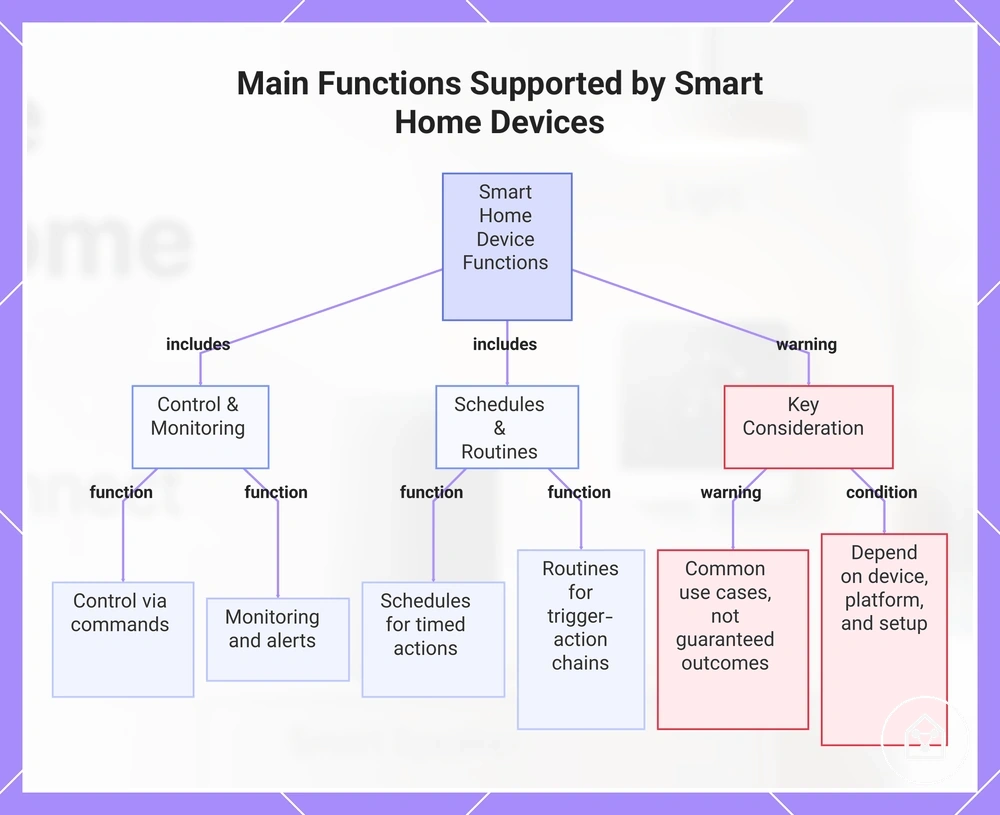
Smart home device functions are practical outcomes of connected capability, allowing devices to support activities such as control, monitoring, alerts, schedules, routines, access, comfort, security, and energy use support. These functions describe what smart home devices can support when the required device features, connections, and setup conditions are available.
A single smart home device can support multiple functions depending on its design and configuration.
A single smart home device can support multiple functions depending on its design and configuration. For example, a smart thermostat can support temperature control, schedules, and comfort-related routines when those functions are included in the connected system.
- Control: Smart home devices support control by receiving commands through an app, controller, or supported interface and producing a related response.
- Monitoring: Smart home devices support monitoring by providing status information or observations when sensors or other monitoring features are available.
- Alerts: Smart home devices support alerts by sending notifications when a supported condition or event is detected.
- Schedules: Smart home devices support schedules by performing actions at defined times when scheduling features are available.
- Routines: Smart home devices support routines by connecting triggers and actions through supported automation features.
- Access: Smart home devices support access functions by managing connected entry features through supported systems.
- Comfort: Smart home devices support comfort-related adjustments, such as temperature or lighting changes, when those capabilities are available.
- Security: Smart home devices support security-related monitoring and notifications when supported by devices such as cameras, sensors, or locks.
- Energy use: Smart home devices support energy-use awareness or control when connected devices provide related monitoring or adjustment features.
These functions represent common use cases rather than guaranteed outcomes, because results depend on the device, platform, and setup. Learn more about connected actions and routines through smart home automation basics.
Learn more about connected actions and routines through smart home automation basics .
This chart shows the main functions of smart home devices, grouped into control and monitoring, schedules and routines, and a key warning about their dependence on device, platform, and setup.
Control, alerts, schedules, routines, and energy use
Control, alerts, schedules, routines, and energy use functions turn smart home device capability into everyday actions. These functions connect triggers, commands, timing, and device conditions with possible responses when the required features are available.
- Control: Control functions use a command from an app or interface as a trigger, allowing a supported device to perform an action and provide a response.
- Alerts: Alert functions use a device condition or status change as a trigger, allowing a notification to be sent when the system supports that response.
- Schedules: Schedule functions use timing as a trigger, allowing supported devices to perform actions at defined times.
- Routines: Routine functions connect triggers and actions, allowing supported devices to respond to configured conditions within a connected system.
- Energy use: Energy-use functions use information from supported devices such as plugs or thermostats to provide awareness or control options, but the outcome depends on the device, configuration, and conditions.
For example, a motion sensor can provide a trigger, a schedule can define timing, and a smart plug can perform an action when those functions are supported together. This shows how separate smart functions can work together without guaranteeing a specific result.
Basic limits that affect how smart home devices work
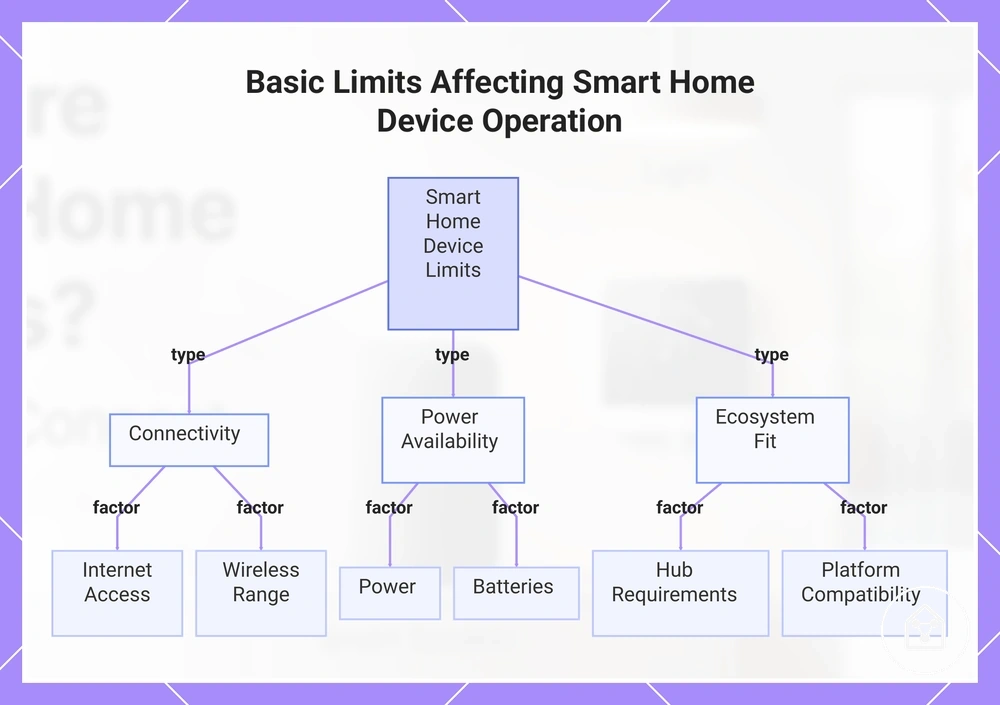
Smart home device reliability depends on device design, network conditions, and ecosystem fit. These conditions can affect whether features such as control, monitoring, and automation operate as expected in a specific home environment.
Smart home device reliability depends on device design, network conditions, and ecosystem fit.
Common limits are related to how smart home devices connect, receive power, and interact with supported platforms. These operating limits do not mean a device will fail, but they can affect available features, communication, and user control when conditions are not suitable.
- Internet access: Internet access can affect cloud-based features, remote access, and services that require an online connection, while supported local functions may continue when available.
- Local control: Local control affects how devices operate when communication occurs directly within the home network instead of through external services.
- Power: Power availability affects whether a smart home device can operate and maintain supported functions.
- Batteries: Batteries affect battery-powered devices because available power can influence device status and supported operation.
- Wireless range: Wireless range can affect communication when distance, walls, or other physical conditions reduce signal quality.
- Hub requirements: Hub requirements depend on the device protocol and ecosystem, because some devices use a bridge or hub while others do not.
- App support: App support affects how users access controls, status information, and available device features.
- Updates: Updates can affect available features, compatibility, and continued platform support.
- Privacy settings: Privacy settings affect how users manage access, notifications, and information sharing within supported systems.
- Platform compatibility: Platform compatibility affects whether a device can connect with the required ecosystem and supported control methods.
These limits provide basic context for how smart home devices operate without replacing detailed troubleshooting or purchasing guidance. For a broader overview of connected devices and their place within a smart home system, see smart home devices hub.
For a broader overview of connected devices and their place within a smart home system, see smart home devices hub .
This chart categorizes the three main types of basic limits that can affect smart home device features, communication, and control.