Smart Home Device Privacy Guide
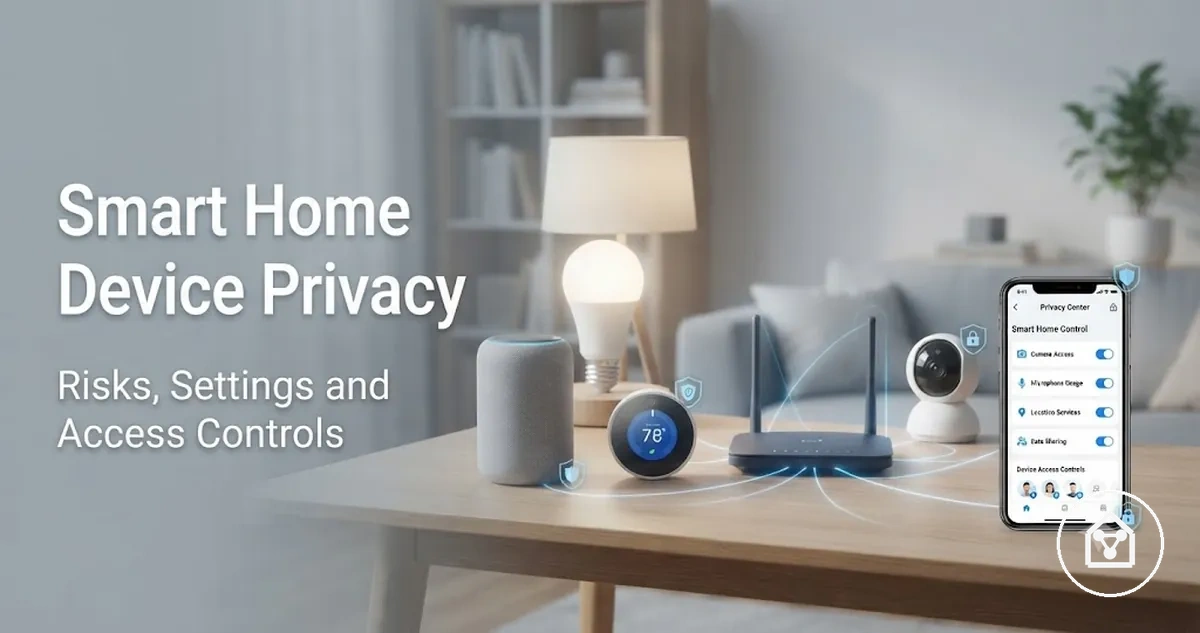
Smart home device privacy is the control of how connected devices collect, store, share, and expose household data, recordings, permissions, and access. Smart home devices create privacy exposure because cameras, microphones, sensors, apps, and cloud services can process information connected to household activity. The privacy impact depends on device type, enabled features, privacy settings, app permissions, and the people who have access to the connected system.
The privacy impact depends on device type, enabled features, privacy settings, app permissions, and the people who have access to the connected system.
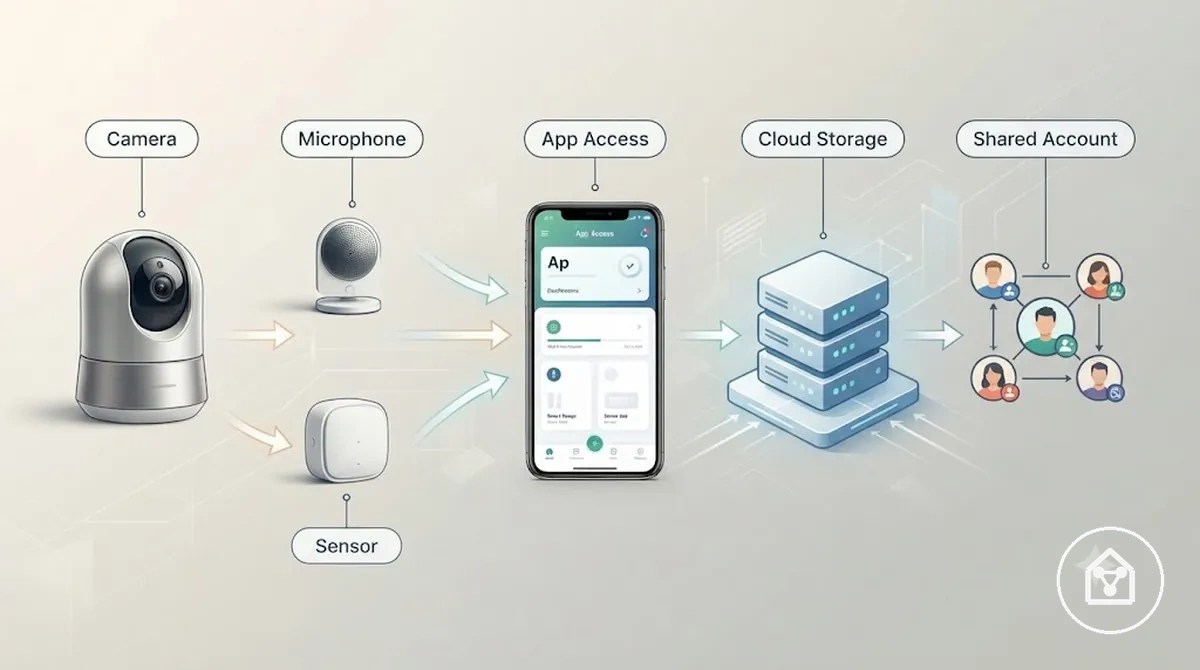
Common sources of smart home device privacy concerns include cameras that capture shared spaces, microphones that process voice interactions, sensors that record activity signals, apps that manage permissions, cloud storage that holds device data, and shared users who access connected features. These sources create different privacy conditions because each device, account setup, and access control arrangement determines what information is collected, stored, or shared.
For example, a household using a smart camera, speaker, and motion sensor may need to review different privacy settings for each device.
For example, a household using a smart camera, speaker, and motion sensor may need to review different privacy settings for each device. The camera may involve recorded images, the speaker may involve voice interactions, and the sensor may involve activity information depending on the enabled functions and access permissions. This illustrates why privacy focuses on data collection, sharing, permissions, and household access, while security focuses on protecting systems from unauthorised access.
It helps users interpret connected device choices and account controls without treating any single setting as a guarantee of complete privacy.
This guide explains how smart home device privacy works through data exposure, app permissions, access controls, household activity, and privacy settings. It helps users interpret connected device choices and account controls without treating any single setting as a guarantee of complete privacy.
Table of Contents
What Smart Home Device Privacy Means
Smart home device privacy is the control of what connected devices collect, store, share, and expose inside a household. It defines how smart home devices, apps, and access points handle household data through collection conditions and privacy controls. The main privacy considerations involve data collection, storage, sharing, and exposure rather than assuming every connected device processes information in the same way.
Privacy controls data exposure, while security controls protection against unauthorised access.
Smart home device privacy includes understanding what data a connected device or app collects, where that data is stored, who can access it, and when sharing occurs. Privacy controls include reviewing app permissions, account access, and device settings that influence visibility and control outcomes. For example, a camera may process image data while a smart speaker may process voice interactions, but the privacy risk depends on the enabled features, permissions, and household access arrangement. Privacy controls data exposure, while security controls protection against unauthorised access.
For example, a household can review a camera app's permissions and limit access to selected users to reduce unnecessary data exposure.
Connected devices create privacy relationships between the device or app, the data type involved, the collection condition, and the resulting control outcome. The broader smart home devices hub context explains how connected devices operate together, while smart home device privacy focuses on how each component handles information. For example, a household can review a camera app's permissions and limit access to selected users to reduce unnecessary data exposure.
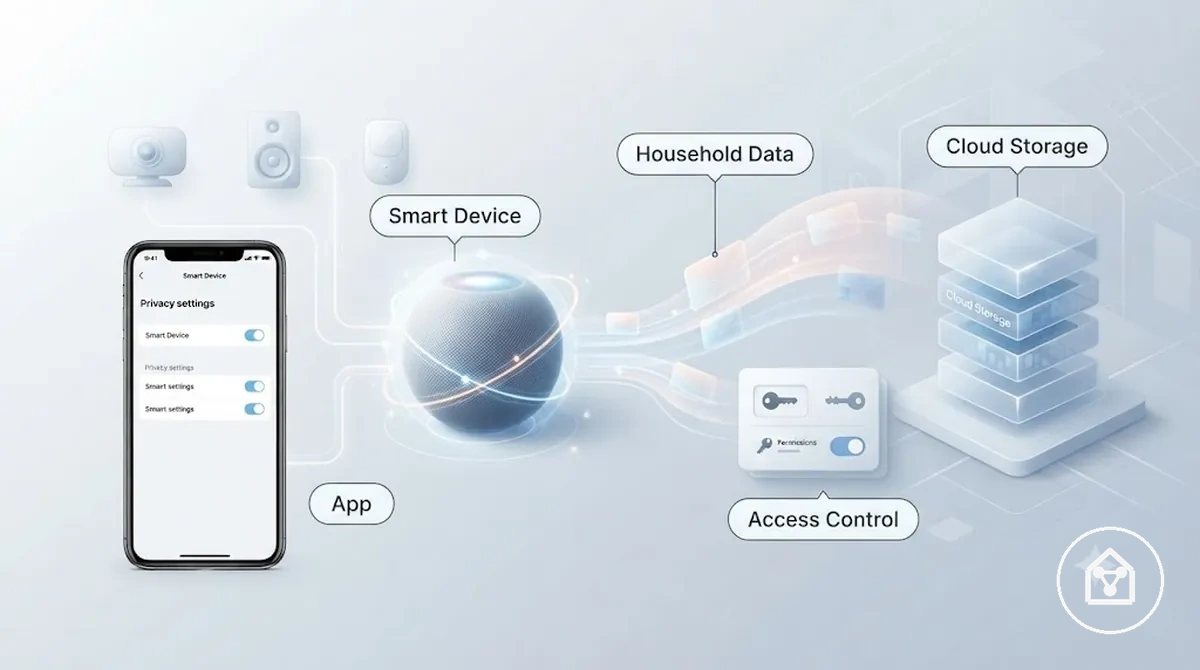
Smart home device privacy does not mean every connected device collects the same information or creates the same privacy risk. Device type, app permissions, account roles, and settings determine how household data is collected, stored, shared, and exposed.
Privacy Risks in Connected Home Devices
Privacy risks in connected home devices arise from what devices sense, record, infer, store, share, and allow others to access. Cameras, microphones, sensors, apps, and cloud services can create privacy exposure when household data is collected, retained, or made visible under specific device, storage, and access conditions.
Privacy risks in connected home devices arise from what devices sense, record, infer, store, share, and allow others to access.
Connected home devices create different privacy risks because the device type, data type, storage method, and access condition shape the possible exposure. A camera can involve visual recordings, a microphone can involve voice capture, and a sensor can create motion or presence signals, while cloud retention, shared accounts, weak permissions, and unintended access can affect who sees or controls that information. A device does not create the same privacy outcome in every household because settings, user roles, and enabled features change the data handling context.
The table below groups common risk pathways by device type, data type, storage method, and access condition.
Privacy Risks in Connected Home Devices can be organised by the source of information, the privacy attribute involved, the condition that creates exposure, and the possible outcome. The table below groups common risk pathways by device type, data type, storage method, and access condition.
| Device or data source | Privacy attribute | Risk condition | Possible exposure |
|---|---|---|---|
| Cameras | Recording and visual capture | Images or recordings are available through enabled features or user access | Shared-space activity may become visible |
| Microphones | Voice capture | Voice interactions are processed through connected device functions | Audio-related household information may be exposed |
| Sensors | Motion sensing and presence detection | Activity signals are stored or shared through connected systems | Household routines or occupancy patterns may be inferred |
| App logs | Device history | Usage records remain accessible through app permissions or accounts | Connected device activity may be visible to authorised users |
| Cloud storage | Data retention | Device information is stored through a connected service | Stored data access depends on account and service settings |
| Shared accounts | User access | Multiple users retain permissions for connected devices | Device controls or history may be available to shared users |
| Presence or location signals | Activity inference | Enabled features record signals related to household activity | Occupancy or routine patterns may be inferred |
A practical example is a household where a smart camera remains connected to a shared account after a change in users. The privacy exposure does not come from the camera alone; it comes from the combination of recorded data, account permissions, and who can access the device history. Reviewing access settings can reduce unnecessary exposure, while privacy concerns remain separate from broader smart home device security practices.
Device Data and Household Activity
Device data can reveal household activity when logs, events, or app records are stored, shared, or accessible through connected systems. Device logs, motion events, voice requests, app interactions, and location signals can become privacy-relevant because they may indicate routines, occupancy, movement, or usage patterns under specific storage and access conditions.
A practical example is a smart home sensor that records repeated motion events while an app stores activity history.
A practical example is a smart home sensor that records repeated motion events while an app stores activity history. A single event may show movement at a specific point, but repeated device logs combined with storage or sharing settings can reveal patterns such as room usage or household routines. The privacy exposure depends on how the device data is recorded, who can access it, and whether the activity records remain available.
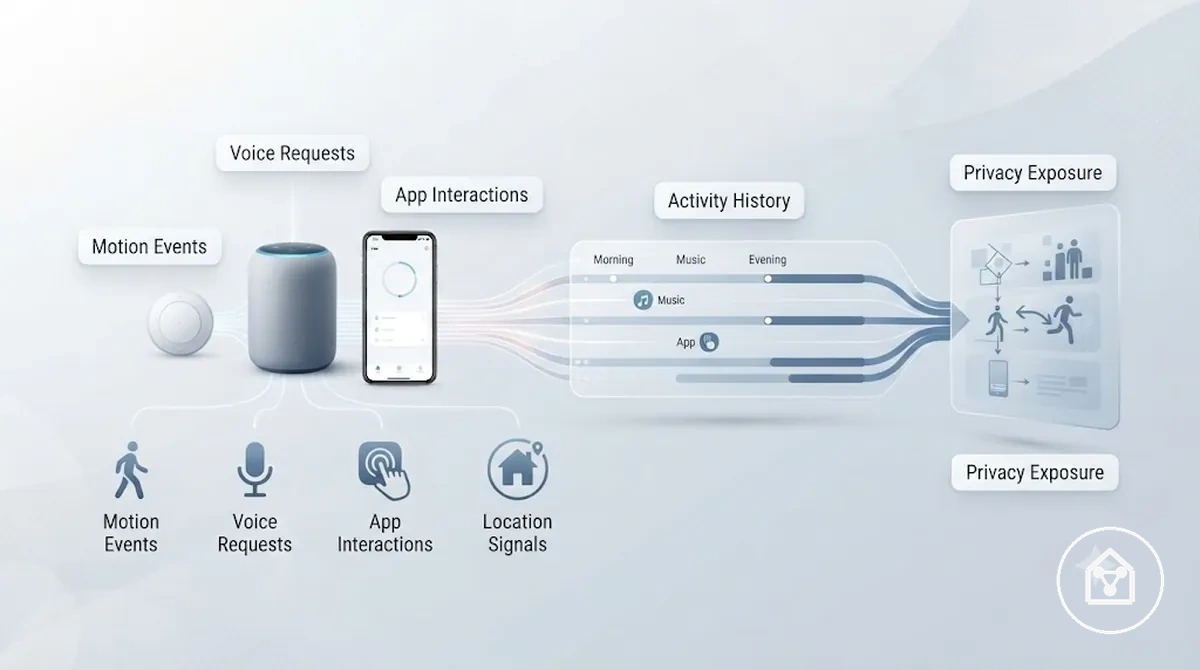
Device Data and Household Activity can be grouped by the type of information a connected device produces and what that information can reveal:
- Device logs: Record device events and may show usage patterns when activity history remains accessible.
- Motion events: Show movement or presence signals when sensors record changes in activity.
- Voice requests: Represent voice interactions processed through enabled smart device features.
- App interactions: Show actions taken through connected applications and related activity records.
- Location signals: Indicate presence-related information when enabled features use location or occupancy data.
Cameras, Microphones, Sensors, and Shared Spaces
Privacy risks increase when cameras, microphones, and sensors operate in shared or sensitive spaces because each device type can expose different forms of household activity. Cameras can create visible recording exposure, microphones can involve voice capture, and sensors can create less visible signals through motion detection or presence sensing.
The privacy impact depends on whether guests, children, visitors, or other people use the space and how the device data is handled.
Cameras, microphones, and sensors expose different types of information depending on the room context, device function, and user expectations. Camera views may show activity in shared spaces, while listening modes and sensor inference can reveal less visible information about household activity. The privacy impact depends on whether guests, children, visitors, or other people use the space and how the device data is handled.
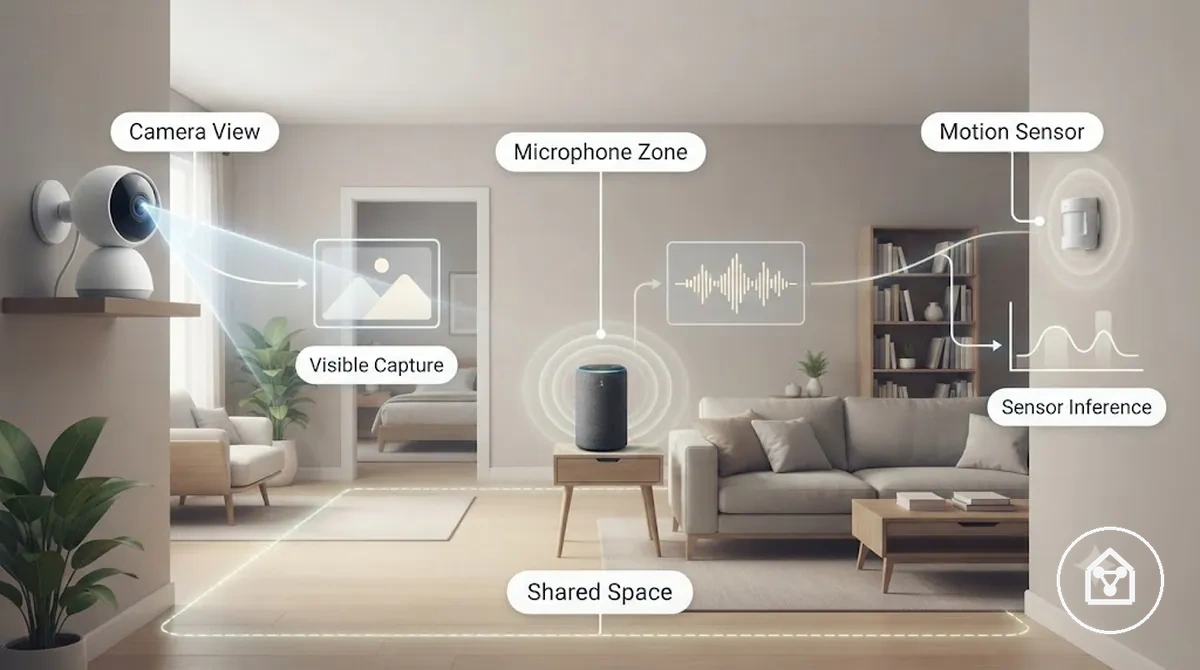
Cameras, Microphones, Sensors, and Shared Spaces can be compared by separating visible capture risk from inference-based risk:
| Visible capture risk | Inference-based risk |
|---|---|
| Camera views: Cameras can capture visible activity in shared rooms. | Camera patterns: Repeated recordings may reveal activity context when access is available. |
| Microphone modes: Microphones can process voice interactions through enabled listening features. | Voice context: Voice-related activity may provide additional household information. |
| Motion events: Sensors can detect movement changes in shared spaces. | Presence sensing: Repeated sensor signals may indicate occupancy or routines. |
| Door sensing: Door sensors can record access-related events. | Room patterns: Combined signals may provide context about movement within a space. |
| Shared rooms: Guests, children, and visitors may enter areas where devices operate. | Room expectations: Privacy concerns depend on how people use and understand the space. |
Smart Home App Privacy and Data Sharing
Smart home app privacy depends on app permissions, data collection, cloud processing, account settings, and sharing controls that determine how connected services handle device information. Reviewing these settings helps users understand what an app can access, process, or share based on the device, account, and enabled features.
The effect depends on the app configuration, device context, region, account settings, and user choices.
Apps and integrations can expand privacy exposure because connected services may process device data, analytics, diagnostic data, or stored information through different settings and access conditions. Cloud storage, partner integrations, and connected services can influence how information moves between devices, platforms, and users, while shared accounts can change who can view or manage app features. The effect depends on the app configuration, device context, region, account settings, and user choices.
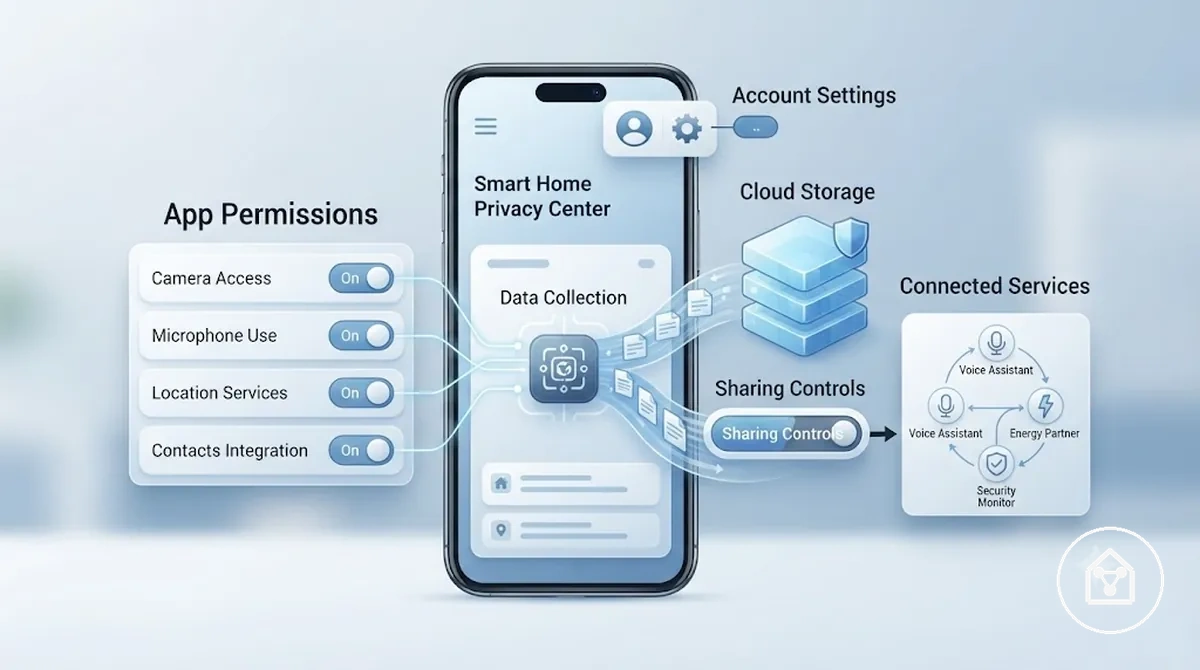
Smart Home App Privacy and Data Sharing can be reviewed through app-level controls that help verify permissions, data handling, storage, and sharing options:
- App permissions: Verify which device features, data categories, or access points an app can use.
- Data collection: Review what types of analytics, diagnostic data, or usage information the app processes.
- Cloud storage: Check whether device information is stored through connected cloud services.
- Analytics and diagnostics: Review whether activity information is used for service improvement or troubleshooting features.
- Partner integrations: Check connected services and sharing controls that allow data exchange with other platforms.
- Shared accounts: Confirm which users have account access and control over connected devices.
- History options: Review available activity records, deletion options, or stored history settings.
Privacy policies and settings language describe how an app handles information, but interpreting those details requires looking at the actual controls available in the account. Users can focus on permissions, sharing controls, and connected services without treating policy wording as a substitute for reviewing settings.
Reviewing smart home app privacy settings is useful before connecting more devices or adding new users.
Reviewing smart home app privacy settings is useful before connecting more devices or adding new users. A change in account access, integration, or device connection can create a new sharing condition that requires another review of permissions and data controls.
Personal Data Collected by Smart Home Apps
Smart home apps may collect or process different personal data and household data categories depending on device features, app permissions, region, and user settings. Common categories include account details, device identifiers, location information, usage logs, and metadata connected to device activity, while the exact collection condition depends on the enabled features and permissions.
The categories below describe common types of app data without implying that every smart home app collects all available information.
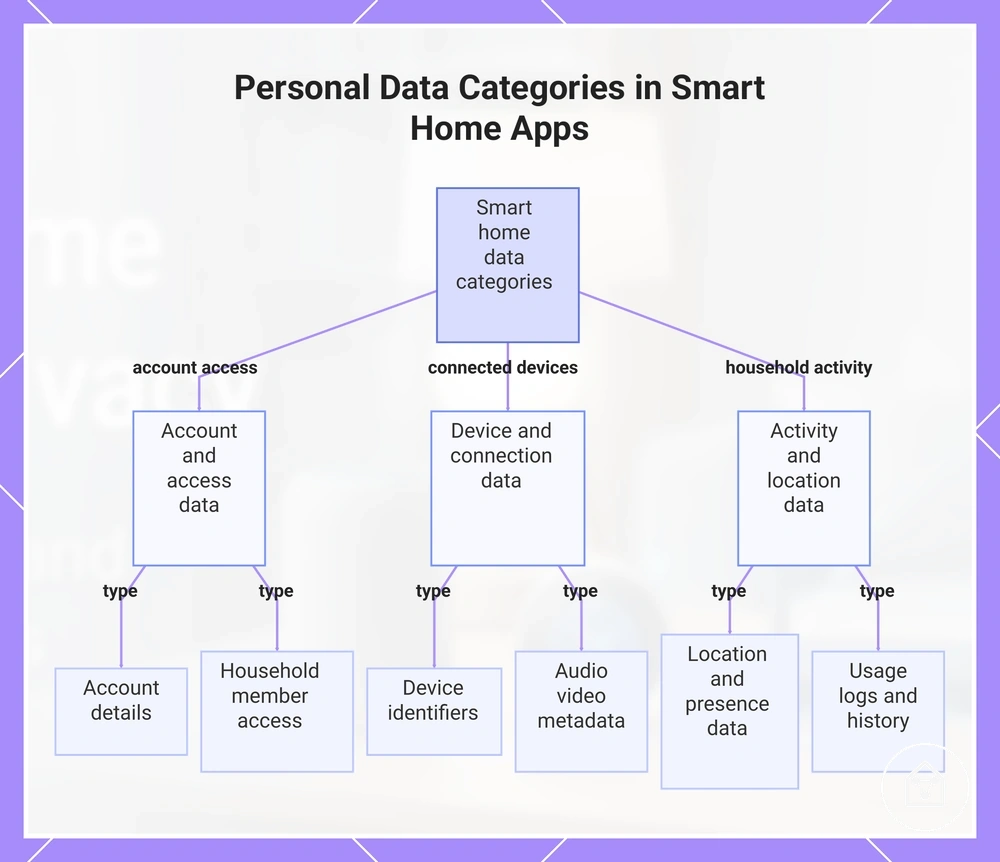
Personal data collected by smart home apps can be grouped by how the information relates to connected devices, household activity, and account access. These data categories may create different privacy relevance when they are stored, processed, or shared through app features or connected services. The categories below describe common types of app data without implying that every smart home app collects all available information.
These data categories may create different privacy relevance when they are stored, processed, or shared through app features or connected services.
Personal Data Collected by Smart Home Apps can be grouped into key data categories that help identify what information an app may handle:
- Account details: User account information and profile details used to manage connected devices and services.
- Device identifiers: Device IDs and connection-related information used to recognise or manage smart home devices.
- Location and presence data: Location signals or presence information that may support features when enabled through permissions and settings.
- Usage logs and automation history: Records of device interactions, automation events, or activity history created through connected features.
- Audio and video metadata: Information related to audio or video features, such as recording context or media activity details.
- Household member access: Account roles and permissions that determine who can access connected device information.
This chart shows the main groups of personal data that smart home apps may collect, organized by how the data relates to account access, connected devices, and household activity.
Cloud Storage, Tracking, and Third-Party Access
Cloud storage and connected services can extend privacy exposure beyond the physical home because device information may be stored, processed, or accessed through external systems. Usage tracking, integrations, and third-party access create additional privacy conditions when data moves through cloud services, account connections, or linked platforms.
Reviewing these settings helps clarify what access conditions apply before enabling additional integrations.
Cloud storage, usage tracking, access logs, and connected integrations can influence how stored history is managed and how information moves between services. Retention duration, deletion limits, data sharing defaults, and integration permissions are often settings to verify because available controls differ by device, platform, account configuration, and connected service. Reviewing these settings helps clarify what access conditions apply before enabling additional integrations.
Cloud storage, usage tracking, access logs, and connected integrations can influence how stored history is managed and how information moves between services.
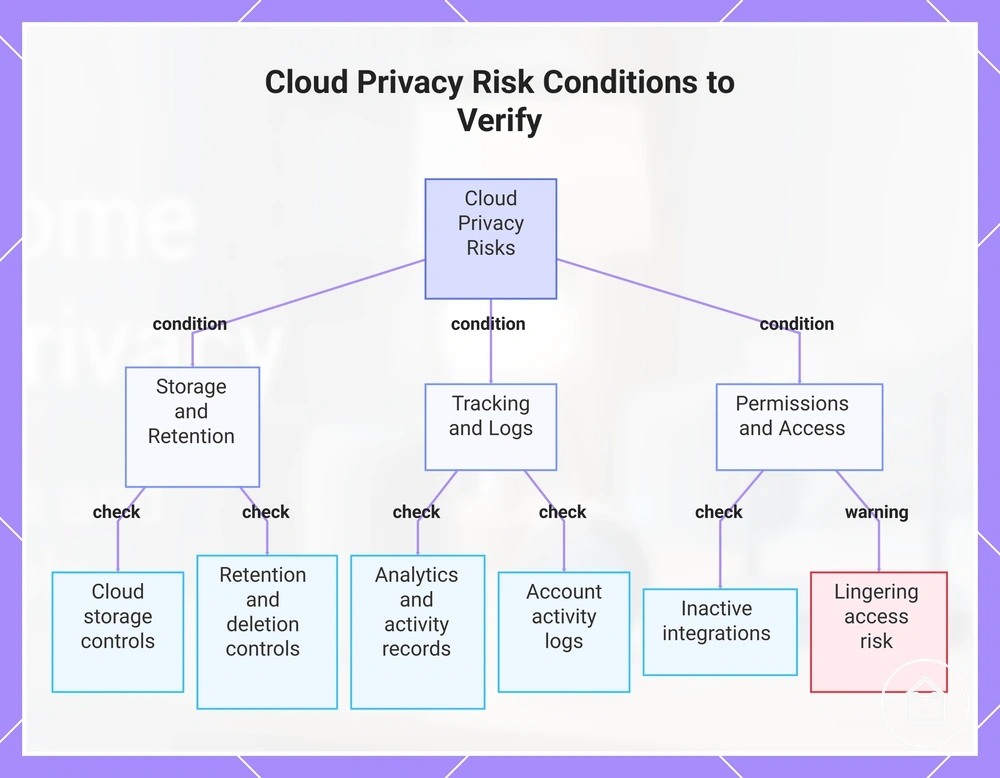
Cloud Storage, Tracking, and Third-Party Access can be reviewed through common risk conditions that help verify where privacy exposure may extend:
- Cloud storage: Verify whether device data or stored history is kept through connected cloud services and what storage controls are available.
- Usage tracking: Review analytics, app interactions, and activity records that may be processed through connected services.
- Third-party access: Check integration permissions and connected services that may receive or exchange device-related information.
- Access logs: Review available records showing account activity or connected-service access where those settings are provided.
- Deletion and retention settings: Verify available removal options, stored history controls, and retention settings before relying on deletion features.
- Unused connected services: Check whether inactive integrations or accounts still permit access to connected devices.
A practical edge case is a connected service that remains linked after a device is no longer actively used. If an integration or account permission remains enabled, the service may continue to have access according to the configured settings. Reviewing connected services and removing unused access where available helps verify the current access condition.
A practical edge case is a connected service that remains linked after a device is no longer actively used.
This chart categorizes the key privacy risk conditions to check for cloud storage, tracking, and third-party access.
Device Permissions and Household Access Controls
Device permissions and household access controls determine who can view, change, record, or share smart home data. These controls depend on user roles, device types, and data sensitivity because access needs can differ between people who manage devices and people who only need limited access.
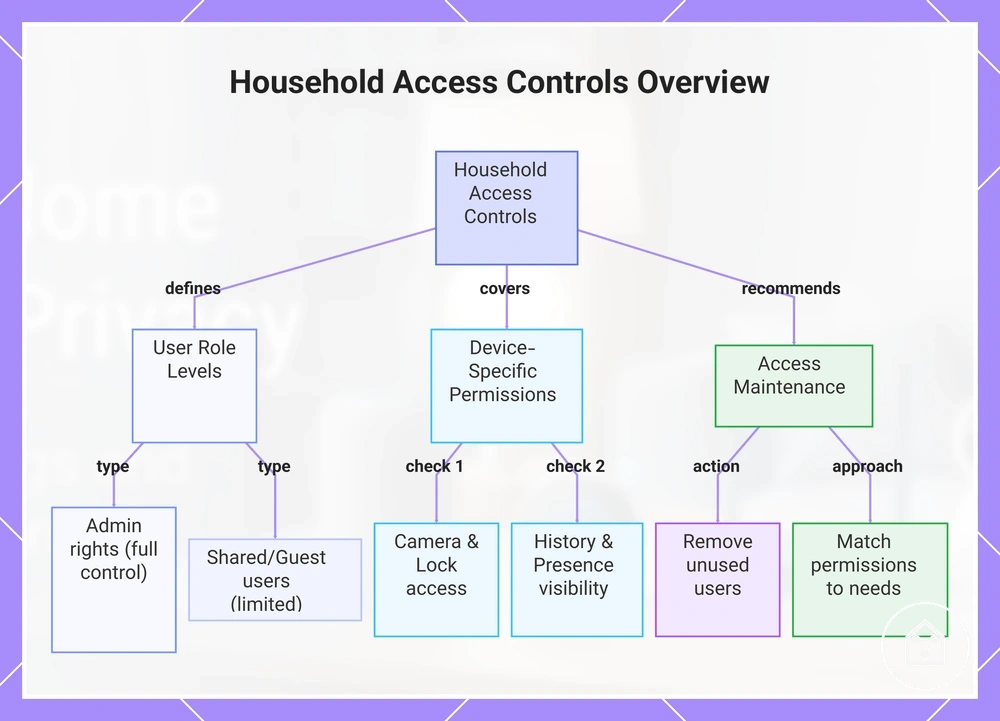
Household access controls work by connecting users, roles, devices, and permitted actions.
Household access controls work by connecting users, roles, devices, and permitted actions. Admin rights may provide broader control, while shared users or guests may have more limited permissions depending on the platform, account setup, and device type. This EAV relationship can be understood as the user role, the allowed action, and the resulting control outcome.
This EAV relationship can be understood as the user role, the allowed action, and the resulting control outcome.
Device Permissions and Household Access Controls can be reviewed through this checklist to verify which users have access and what level of control is appropriate:
- Admin rights: Review which users have the highest level of control over connected devices and account settings.
- Shared users: Check which household members can view or manage devices through shared access permissions.
- Guest access: Verify whether visitors or temporary users have limited control rather than broader device access.
- Camera access: Review which users can view camera feeds or related device information.
- Lock access: Check which users can control connected locks and whether that access matches their household role.
- History visibility: Review who can view stored activity history or device records.
- Presence permissions: Verify which users or connected services can access presence-related information.
- Unused users: Review and remove users who no longer need access according to available platform settings.
Reducing unnecessary access does not require removing all household sharing. A criteria-based approach is to match permissions with each person's needs, such as providing device control to household members while limiting access for temporary users where the platform allows it.
Reducing unnecessary access does not require removing all household sharing.
Household changes, such as a user leaving or no longer needing access, are situations where permission reviews become useful. Removing unused users can reduce available access paths, but the result depends on the platform, account configuration, and connected device settings.
Household changes, such as a user leaving or no longer needing access, are situations where permission reviews become useful.
This chart shows the main components of smart home access controls, including user role levels, device-specific permissions, and recommended maintenance actions.
Shared Users, Guest Access, and Admin Roles
Shared users, guest access, and admin roles affect who can view device history, control devices, or change settings in a smart home. These roles influence privacy because different users may have different levels of visibility and control depending on the platform, account configuration, and device type.
Shared users, guest access, and admin roles affect who can view device history, control devices, or change settings in a smart home.
Shared Users, Guest Access, and Admin Roles can be compared by looking at the access each role may receive and the review action that helps maintain appropriate household access. Role names and permissions can vary by platform, so the same role label does not necessarily provide identical capabilities across different systems.
| Role type | Possible access | Privacy concern | Review action |
|---|---|---|---|
| Owner | May have broad control over devices, settings, and household access options. | Broad visibility may include device history or access management. | Review whether the current level of control matches household needs. |
| Admin | May be able to change settings or manage users where supported. | Higher control levels may expose more device information if access is no longer needed. | Verify which admin roles remain appropriate. |
| Household member | May receive access to selected devices or features through assigned permissions. | Access may include visibility into shared device activity. | Check that access matches the person's household role. |
| Guest | May receive limited access to specific devices or functions where available. | Broader access than required may increase unnecessary visibility. | Review guest access limits and remove access when it is no longer needed. |
| Installer | May have temporary access during device setup or configuration if permitted. | Unused access may remain available after the original task ends. | Confirm whether installer access should remain active. |
| Former user | May retain access if permissions are not reviewed after a household change. | Previous access may provide visibility into devices or stored information. | Review and downgrade or remove access according to available settings. |
A practical household-change scenario is when a former user, guest, or installer no longer needs access to connected devices. Reviewing the role and adjusting permissions can reduce unnecessary access, but the outcome depends on the platform, account setup, and available controls.
Camera, Lock, History, and Presence Permissions
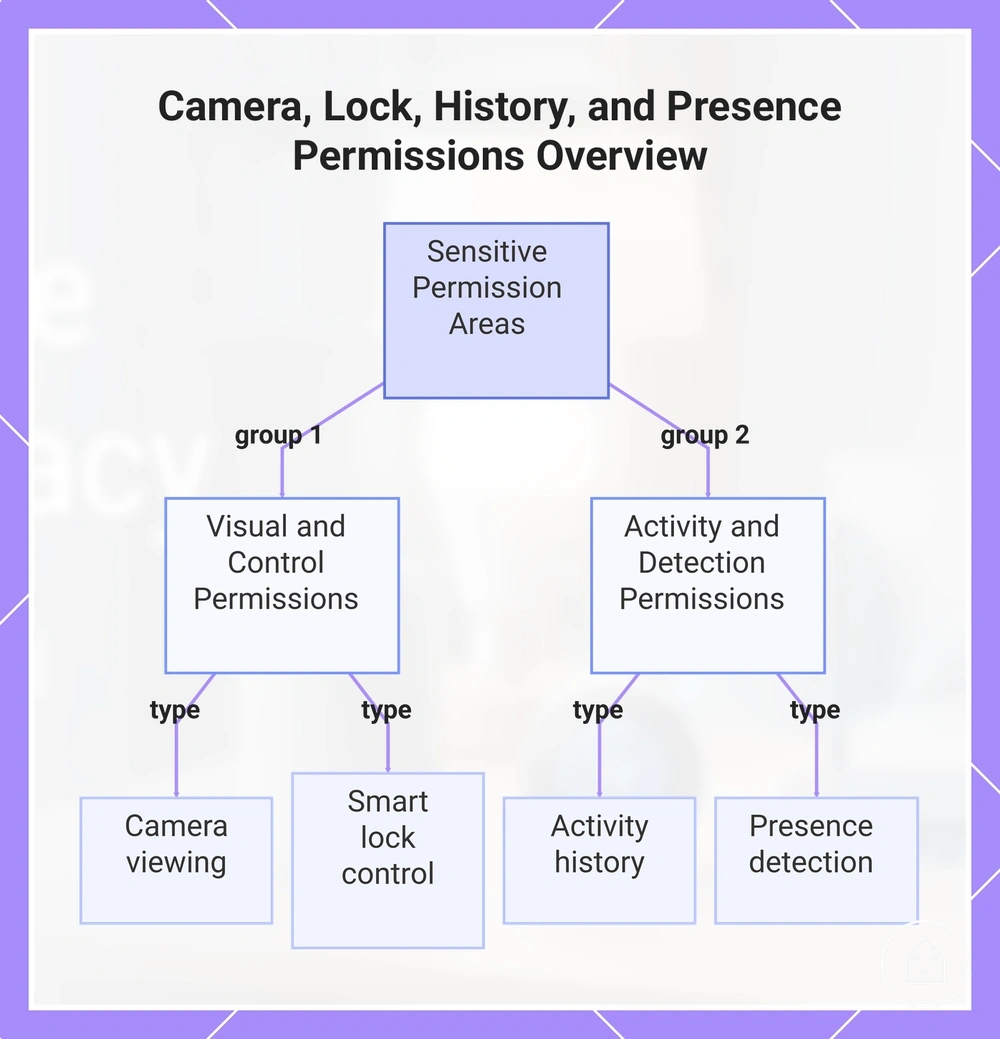
Camera permissions, lock permissions, history permissions, and presence permissions are sensitive access areas because they can affect who can view information, control devices, or understand household activity. These permissions can influence privacy outcomes, but the available access options vary by device feature, platform, account role, and user settings.
These permissions can influence privacy outcomes, but the available access options vary by device feature, platform, account role, and user settings.
Camera, Lock, History, and Presence Permissions can be understood by connecting each device feature with its permission level and possible exposure or control outcome. Camera viewing may allow access to visual information, smart lock control may allow device actions, activity history may reveal stored events, and presence detection may provide household activity signals when those features and permissions are enabled.
Camera, Lock, History, and Presence Permissions can be understood by connecting each device feature with its permission level and possible exposure or control outcome.
These permission types separate feature-level access areas and show how each one can affect privacy visibility or control:
- Camera viewing: Camera permissions can allow users to view camera feeds or related visual information when access is granted through account roles or device settings.
- Smart lock control: Lock permissions can allow users to control connected lock features when their role and platform settings provide that capability.
- Activity history: History permissions can determine who can view stored device events, usage records, or activity history.
- Presence detection: Presence permissions can allow access to occupancy-related information or presence signals when those features are enabled.
This chart shows the four sensitive permission areas and how they are grouped into visual/control and activity/detection categories.
Privacy Settings for Cameras, Speakers, and Sensors
Privacy settings should be reviewed by device type because cameras, speakers, and sensors expose different forms of household information. Cameras may involve visual recording controls, speakers may involve voice history and microphone settings, and sensors may involve activity or presence data. The relevant privacy controls depend on device features, platform options, account roles, and available settings.
The relevant privacy controls depend on device features, platform options, account roles, and available settings.
Privacy Settings for Cameras, Speakers, and Sensors can be organized by the device type, the setting that requires review, the information or function it controls, and the privacy trade-off involved. The table below separates common settings so users can compare how different devices handle recording, voice, activity, location, and storage controls.
| Device type | Setting to review | What it controls | Privacy trade-off |
|---|---|---|---|
| Cameras | Recording toggles and privacy zones | Controls when visual recording occurs and which areas are excluded from capture where supported. | Reducing recording coverage can limit captured information while keeping selected camera functions available. |
| Smart speakers | Voice history and microphone mute | Controls stored voice interactions and whether microphone features are active. | Limiting voice collection can reduce stored interaction history or available voice features. |
| Motion or presence sensors | Motion sensitivity | Controls how activity signals are detected and processed by the sensor. | Adjusting sensitivity can reduce unnecessary activity signals while changing detection behaviour. |
| Location-based devices | Location use | Controls whether location information supports connected device features. | Restricting location access can reduce location-based functionality. |
| Notifications | Notification settings | Controls which device events create alerts or activity messages. | Adjusting notifications can limit visible activity information shared through alerts. |
| Local or cloud storage options | Local options and cloud options | Controls where device-related information may be stored or processed. | Storage choices can change how data is handled through connected services. |
Cameras and speakers require different privacy reviews because recording toggles, privacy zones, voice history, and microphone mute controls affect different types of information. For example, a camera user may enable privacy zones for areas that do not need recording, while a speaker user may review voice history settings depending on the available controls.
Sensors require a separate review because motion sensitivity, notification settings, and location use relate to activity signals rather than direct recordings.
Sensors require a separate review because motion sensitivity, notification settings, and location use relate to activity signals rather than direct recordings. Local options and cloud options can also influence data handling choices, so users should review available storage controls based on the device features and connected services they use.
For broader guidance on the setup stage, users can review privacy during setup as part of their device review process.
Reviewing these settings during configuration helps users understand device-specific privacy controls before expanding a connected system. For broader guidance on the setup stage, users can review privacy during setup as part of their device review process.
Recording, Voice, Motion, and Location Controls
Recording controls, voice capture controls, motion settings, and location controls govern how smart home devices capture information, store histories, detect activity, and use location-related data. These controls affect privacy outcomes by changing what information is collected, stored, or visible, but the result depends on the device features, platform options, and enabled settings.
The checklist below separates the main control areas so users can review the settings that influence exposure conditions.
Recording, Voice, Motion, and Location Controls can be verified by checking the toggles, histories, and permissions that manage capture, sensing, and data visibility. The checklist below separates the main control areas so users can review the settings that influence exposure conditions.
- Recording status: Verify recording controls and camera control settings to understand when visual information or stored recordings are active.
- Voice assistant history: Check voice assistant history and microphone settings to review how voice capture information is stored or managed.
- Motion sensitivity: Review motion sensitivity settings to understand how motion events are detected and how household activity signals are processed.
- Location permissions: Verify location permissions and location controls to understand when apps or devices can use location information for connected features.
- Activity logs: Review activity logs or activity records to understand which device events and histories remain visible.
- Notification visibility: Check notification visibility settings to understand which device events appear through alerts or shared notifications.
Adjusting these controls can reduce specific types of privacy exposure while preserving the functions a device is expected to provide. For example, reducing stored voice history or adjusting motion sensitivity may limit certain data conditions, while the appropriate balance depends on the device features and household needs.
Privacy Zones, Mute Controls, and Physical Covers
Privacy zones, mute controls, and physical covers reduce different types of privacy exposure by addressing software processing and physical capture in separate ways. Software controls can affect how devices process information, while physical controls can reduce capture at the source by limiting what a camera or microphone can collect.
Privacy zones, mute controls, and physical covers reduce different types of privacy exposure by addressing software processing and physical capture in separate ways.
Privacy Zones, Mute Controls, and Physical Covers can be reviewed by separating software-based settings from physical controls and their different conditions of use:
- Camera privacy zones: Privacy zones can limit selected areas within a camera view by changing how visual information is processed where the feature is supported.
- Microphone mute buttons: Mute controls can limit microphone activity when the device provides a mute function, but they do not replace account permissions, app settings, or stored history controls.
- Indicator lights: Indicator lights can provide a visible signal about device activity when supported by the device design, but they do not directly control data processing.
- Shutter covers and lens covers: Physical covers can reduce camera capture at the source by blocking the lens, while other privacy settings continue to manage permissions and stored information.
- Device placement: Device placement can influence visibility and exposure in shared spaces by changing what areas are within a device’s view or sensing range.
Physical privacy controls are useful when reducing direct capture is the priority, but they supplement rather than replace software controls. For example, a physical cover can block a camera view, while privacy zones and account settings still influence how the connected system processes and manages information.
Local Control and Privacy-Focused System Choices
Privacy-focused system choices depend on where control, storage, and access management happen within a smart home system. Local control, hub-based control, and cloud-based control affect data handling and remote access in different ways, so the decision criteria include control location, storage approach, permission management, and the level of convenience required.
Privacy-focused system choices depend on where control, storage, and access management happen within a smart home system.
Local control can keep certain processing and management functions closer to the home environment, while hub-based control can centralize device coordination and automation. Cloud dependency can support remote access and connected features but may require account requirements and external service access. These choices create privacy trade-offs involving setup complexity, interoperability, convenience, and how information is handled.
These choices create privacy trade-offs involving setup complexity, interoperability, convenience, and how information is handled.
Local Control and Privacy-Focused System Choices can be evaluated by comparing how each system choice affects data handling, access management, and practical trade-offs:
| System choice factor | Privacy effect | Trade-off | When to prioritize it |
|---|---|---|---|
| Local control | Can keep certain processing and control functions within the local environment. | May require more configuration and maintenance compared with systems that rely on external services. | Prioritize when control location and local data handling are important decision criteria. |
| Hub-based control | Can centralize device management, automation, and access decisions through a smart home hub. | May add setup complexity and requires reviewing how automation storage and device data are handled. | Prioritize when centralized control and automation management are needed. |
| Cloud dependency | Can involve external services for processing, storage, and remote access. | May improve convenience while requiring account management and cloud service access. | Prioritize review when remote access and cloud features are important. |
| Account requirements | Determine how users are identified and how access management is applied. | Accounts can support remote features but add another access layer to review. | Prioritize when multiple users or remote control features are involved. |
| Permission granularity | Controls how specifically users can receive access to devices and functions. | More detailed access settings may require additional management decisions. | Prioritize when shared users and access roles are part of the system. |
| Automation storage | Affects where automation rules, histories, or related settings are stored. | Storage choices can influence convenience, access, and system complexity. | Prioritize when automation history and data handling are important concerns. |
| Interoperability | Affects how connected devices and services exchange information. | Greater system flexibility may require reviewing how connected services handle data. | Prioritize when combining different device types is required. |
Permission granularity, automation storage, account requirements, and interoperability should be evaluated as system-level criteria rather than isolated features. Users can review privacy before choosing devices as part of the criteria used before selecting a connected home approach.
Privacy Checks During Setup and Maintenance
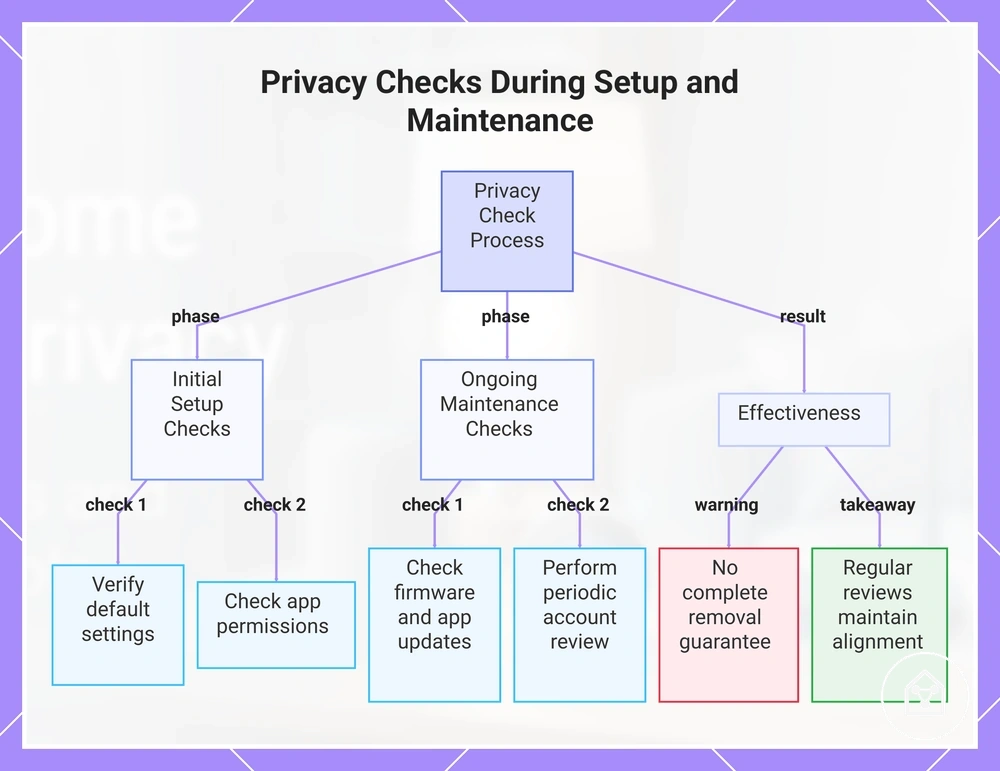
Privacy checks should happen during setup and continue during maintenance because device settings, user access, stored information, and connected services can change over time. A setup check establishes the initial privacy choices, while ongoing maintenance reviews help identify changes caused by new devices, household changes, updates, or account adjustments.
Privacy Checks During Setup and Maintenance can be organized around actions to verify before, during, and after device use.
Privacy Checks During Setup and Maintenance can be organized around actions to verify before, during, and after device use. The checklist below focuses on privacy-specific review points rather than a complete security-hardening process or a purchase decision list.
- Default settings: Verify default settings during setup and review whether available privacy options match the intended device use.
- App permissions: Check app permissions to confirm which device features and information categories an application can access.
- User access: Review user access and shared users after setup, household changes, or when a person no longer needs access.
- Firmware updates and app updates: Check firmware updates and app updates during maintenance reviews because changes may affect settings and available privacy controls.
- Stored history: Review stored history options to understand which activity records remain available and how they are managed.
- Cloud options: Check cloud options to understand how connected services handle stored information and remote features.
- Integrations: Review integrations to verify which connected services or platforms exchange device information.
- Physical placement: Check physical placement to confirm that device visibility and sensing areas match the intended privacy conditions.
- Notifications: Review notification settings to understand which device events create visible alerts or messages.
- Periodic account review: Perform periodic account review to check whether users, permissions, and connected services still match current household needs.
Privacy checks are especially useful during first setup, when adding new devices, after household changes, and during periodic maintenance reviews. Users can also review maintenance for privacy settings as a transition to broader maintenance-related privacy reviews.
Regular reviews help keep privacy choices aligned when connected systems or household conditions change.
Repeating privacy checks does not guarantee that all exposure is removed because outcomes depend on device type, settings, app behavior, and account access. Regular reviews help keep privacy choices aligned when connected systems or household conditions change.
This chart organizes privacy checks into initial setup and ongoing maintenance phases, and highlights the outcome of regular reviews.
This chart organizes privacy checks into initial setup and ongoing maintenance phases, and highlights the outcome of regular reviews.