Smart Home Device Maintenance for Reliable Long-Term Use
Smart home device maintenance is the routine care process that supports reliable long-term use by keeping connected devices in a suitable operating condition. It covers updates, firmware status, cleaning, battery condition, power stability, and connectivity checks because these areas affect device reliability, security, and everyday usefulness. Smart home device maintenance is routine care, not repair.
Smart home device maintenance is routine care, not repair.
A smart home system can include devices such as sensors, cameras, hubs, speakers, plugs, and controllers that require ongoing status reviews after setup. For example, a homeowner checking an app update notification, cleaning dust from sensor contact points, reviewing battery signals, and confirming stable power connections is performing routine maintenance. These recurring checks group firmware, cleaning, battery, power, connectivity, and device testing into one maintenance approach that supports device health and lifespan.
Smart home device maintenance helps users review the condition of connected devices before minor changes affect normal use.
Smart home device maintenance helps users review the condition of connected devices before minor changes affect normal use. The maintenance scope includes software updates, physical cleaning, battery checks, power review, connectivity status, and routine device testing. The following sections focus on these reliability care areas while keeping deeper problem diagnosis and replacement decisions as separate contexts.
Table of Contents
What Smart Home Device Maintenance Covers
Smart home device maintenance covers the software condition, physical condition, power stability, and routine status checks that help connected devices maintain reliability, security, performance, and lifespan. It includes reviewing smart home devices hub components such as sensors, cameras, controllers, and other connected equipment to confirm their operating condition. These maintenance checks focus on ongoing care and device health rather than a full troubleshooting process.
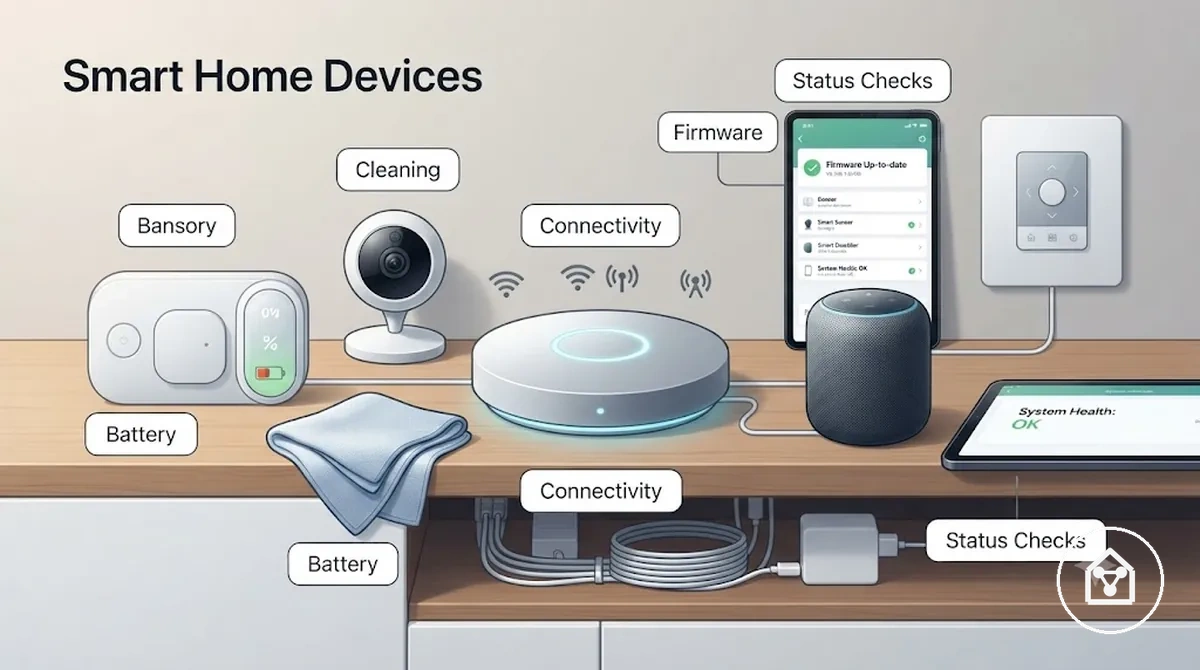
Smart home device maintenance connects each maintenance area with a required check and its reliability effect. Software condition includes firmware and app status reviews, physical condition includes dust and sensor contact checks, and power stability includes battery, cable, and connection status reviews. For example, a motion sensor showing a low battery status in its app can require a battery check before missed automation events reduce everyday performance.
Smart home device maintenance connects each maintenance area with a required check and its reliability effect.
The following checklist verifies the main areas covered by smart home device maintenance before moving into specific maintenance actions.
- Software condition: Review firmware and app status updates when supported to maintain security settings and reliable device operation.
- Physical condition: Check dust, surfaces, and sensor contact points to support accurate device responses and consistent performance.
- Power stability: Review battery condition, adapters, plugs, and cables to identify power conditions that can interrupt operation.
- Connectivity status: Confirm connection status between devices and their control systems to support reliable communication.
- Routine status checks: Review alerts, device responses, and available status information to monitor long-term device health.
Routine maintenance supports setup quality, privacy settings, energy efficiency, and problem prevention, but it does not replace dedicated setup guidance or deeper troubleshooting contexts. The required checks depend on the device type, manufacturer support, usage conditions, network environment, and installation setting.
Software Updates and Firmware Management
Software updates and firmware management help smart home devices maintain reliability, security, compatibility, and feature continuity by keeping device software aligned with supported versions. Firmware controls device-level functions, while app version and hub update status affect how connected components communicate and operate together. Regular version checks help identify available updates, support conditions, and possible compatibility considerations before changes are applied.
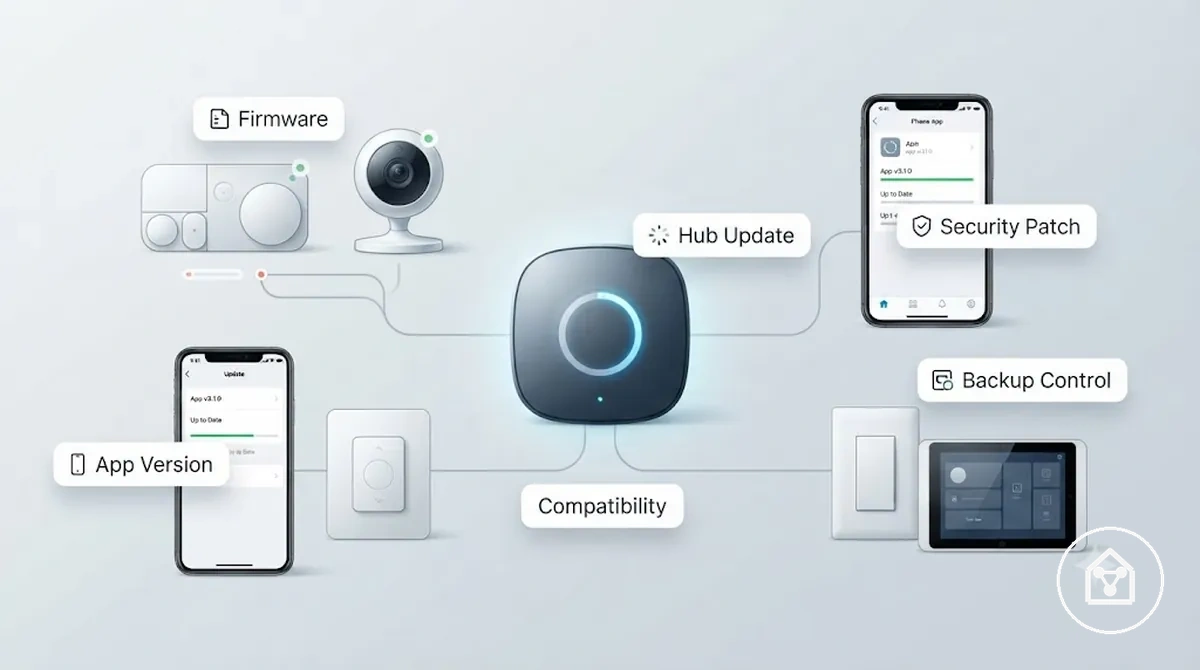
Update handling differs across smart home devices, apps, hubs, and platforms because each component can have a different update type, version status, and device support condition. Safe update habits include reviewing release notes, maintaining stable power during updates, and confirming backup control options where available. For example, a hub update may require checking whether connected devices remain supported after the version change instead of assuming every software update improves performance.
Safe update habits include reviewing release notes, maintaining stable power during updates, and confirming backup control options where available.
The following table organises software updates and firmware management conditions by what to check, why each condition matters, and the qualified next action.
| Item or condition | What to check | Why it matters | Qualified next action |
|---|---|---|---|
| Firmware | Current firmware version and available update status | Helps maintain device reliability and supported security features | Review release notes before applying the update |
| App version | Installed app version and platform support status | Supports communication between the app and connected devices | Check whether the app version remains supported |
| Hub update | Hub firmware version and connected device compatibility | Maintains alignment between the hub and connected smart home devices | Confirm supported devices before completing the update |
| Security patch | Available security updates and documented changes | Provides supported security improvements for compatible devices | Review the update information and requirements |
| Backup control | Available manual controls or alternative access methods | Provides a fallback option when software changes affect normal control | Confirm backup options before major update changes |
Software updates and firmware management are part of routine maintenance, but they do not replace dedicated issue diagnosis when update changes create separate device problems. For update-related issues, review device update problems for more specific guidance.
Automatic Updates and Manual Version Checks
Automatic updates and manual version checks are two update modes that help maintain smart home device software status, with each approach providing different levels of user control. Automatic updates apply supported software changes through configured update settings, while manual version checks require users to review available versions and confirm changes through app confirmation or device controls. The practical maintenance value is understanding which update mode supports reliable device operation, security outcome, and ongoing software support.
Update behaviour depends on manufacturer settings, hubs, apps, and device class, so smart home devices can have different update conditions.
Update behaviour depends on manufacturer settings, hubs, apps, and device class, so smart home devices can have different update conditions. A device may update silently when automatic updates are enabled, require app confirmation before applying changes, or become an unsupported device that needs manual version checks to review available options. For example, a smart home sensor with manual update settings allows the user to review the available software status before applying a supported update.
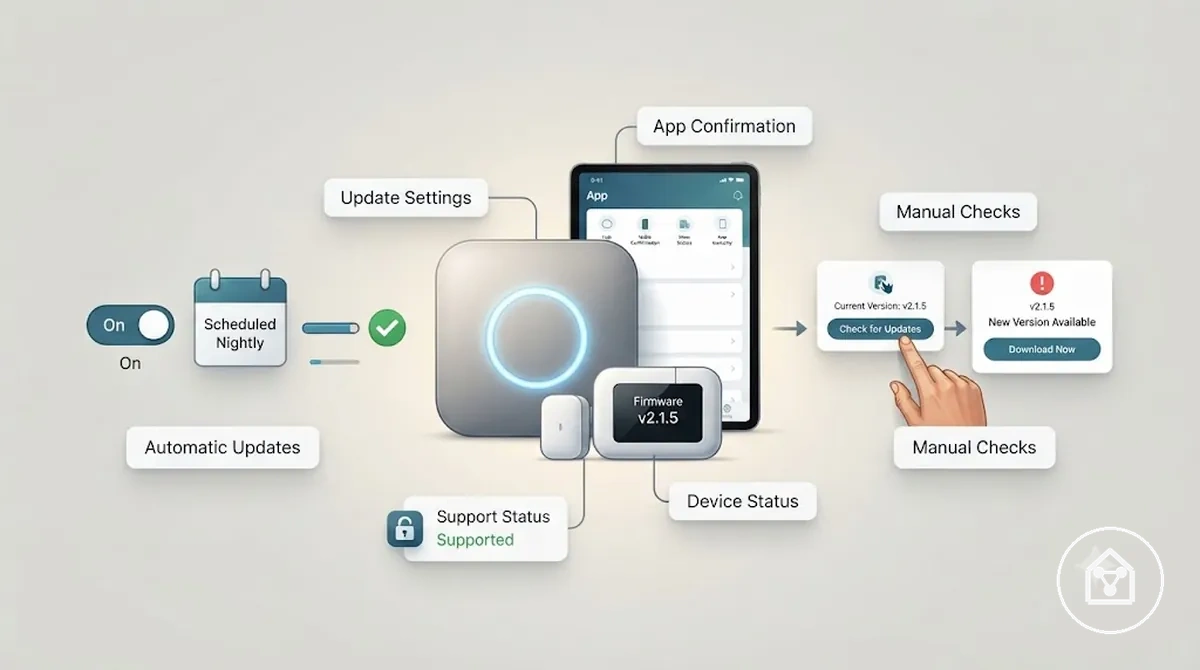
The comparison below shows how automatic updates and manual version checks differ as local maintenance choices.
| Update mode | Maintenance condition |
|---|---|
| Automatic updates | Configured update settings apply supported changes automatically when the device, app, and platform allow this mode. |
| Manual version checks | User review is required to check available versions, app confirmation requests, and support status before applying changes. |
The suitable update mode depends on device support, available settings, and the maintenance level required by the user. Automatic updates can reduce manual review needs, while manual version checks provide more direct control when reviewing security and compatibility conditions.
App, Hub, and Device Update Alignment
App, hub, and device update alignment keeps smart home devices coordinated by matching app version, hub firmware, and device firmware conditions. Compatible version alignment supports stable control, automation, alerts, and pairing when connected components use supported software and protocols. Reviewing update match conditions during maintenance helps identify software compatibility issues before they affect device operation.
The main maintenance check is whether the app, hub, controller, sensor, and device firmware share a compatible update state.
The main maintenance check is whether the app, hub, controller, sensor, and device firmware share a compatible update state. A mismatched version can create pairing problems, limit automation actions, or affect alerts when one component no longer supports the expected protocol alignment. For example, a device with outdated firmware may appear in an app but fail to complete pairing with a hub that requires a newer supported version.
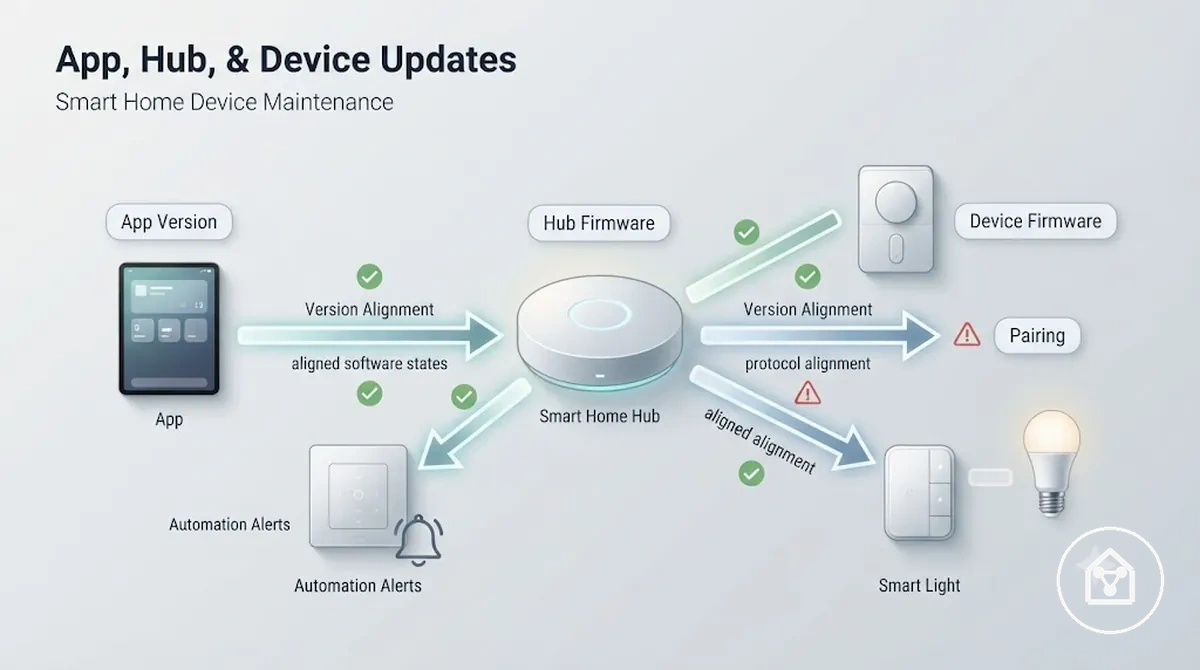
Aligned versions: App version, hub firmware, and device firmware share supported update conditions, allowing connected controls, automation, and alerts to operate normally.
Mismatched versions: Outdated or unsupported firmware states can interrupt pairing, limit device controls, or prevent expected communication between connected components.
Mismatched versions: Outdated or unsupported firmware states can interrupt pairing, limit device controls, or prevent expected communication between connected components.
Physical Cleaning and Device Condition Checks
Physical cleaning and device condition checks help protect smart home device reliability by maintaining surfaces, sensors, controls, and visible components in suitable condition. Cleaning methods should match the device surface, sensor type, and manufacturer guidance because dust, grime, moisture, heat, and wear can affect different device parts in different ways. Regular condition reviews provide practical maintenance value by identifying physical changes before they reduce normal device use.
Each cleaning check connects a device part with a condition, possible risk, and suitable response.
Each cleaning check connects a device part with a condition, possible risk, and suitable response. For example, a camera lens or sensor surface with dust buildup may need careful dry cleaning, while a plug, cable, or mounting point may require a visual wear inspection rather than surface cleaning. Physical checks should remain within safe maintenance practices and avoid methods that could damage electronics.
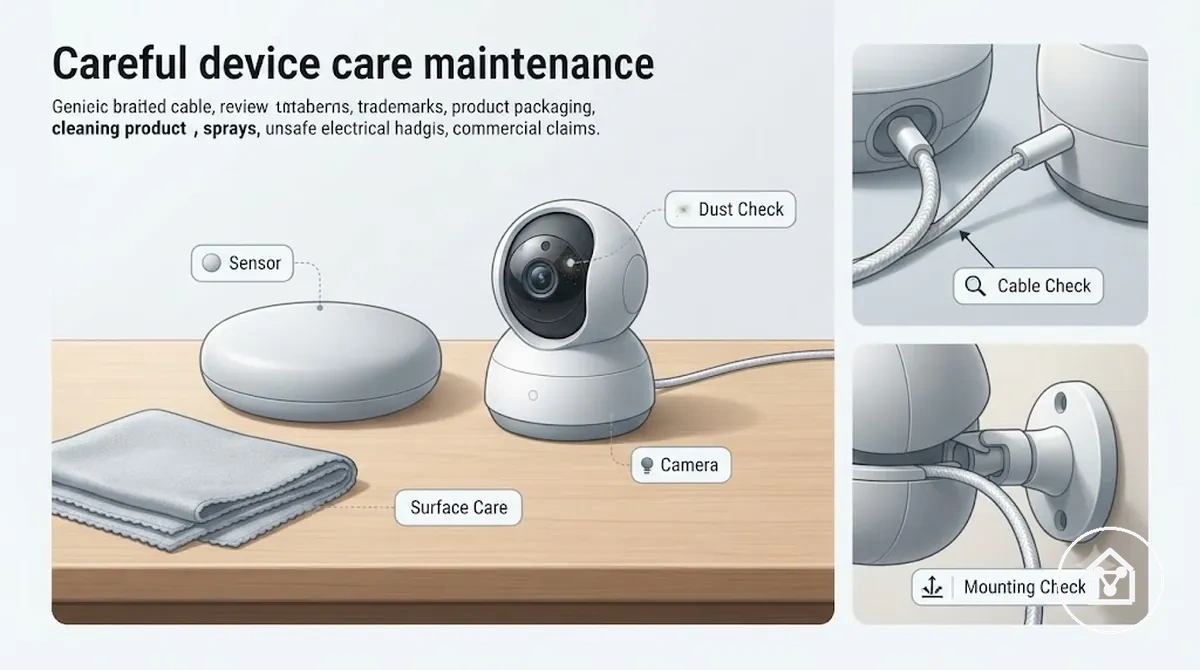
The following checklist verifies common physical cleaning and device condition checks across smart home components.
- Sensor and camera surfaces: Check for dust or grime on sensing areas and use suitable cleaning methods to support clear device responses.
- Screen and control panels: Review visible marks or residue and use appropriate surface care to maintain readable controls.
- Plugs and contact points: Inspect for visible dirt or wear conditions and review the connection state before continued use.
- Cables and mounting points: Check for wear, loose positioning, or environmental exposure that may affect device stability.
- Device housing: Review moisture exposure, heat conditions, and surface changes to identify possible maintenance needs.
Dust, Screens, Sensors, Cameras, and Contact Points
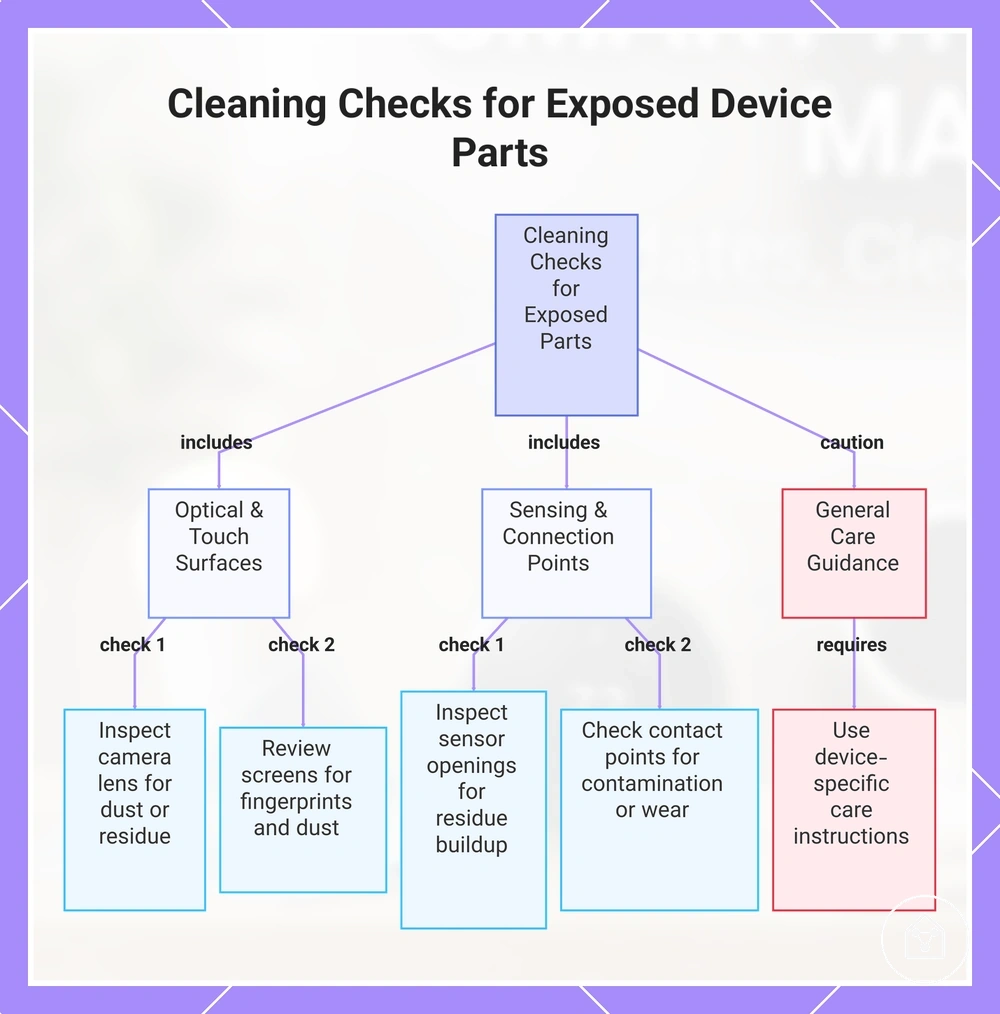
A camera used outdoors may collect surface dust on its lens, while sensors and contact points can collect residue around openings or connection areas. These exposed parts need different cleaning checks because dust, grime, and residue can affect visibility, sensing, or touch response in different ways. Reviewing these areas helps maintain reliable device condition without moving into deeper repair tasks.
Reviewing these areas helps maintain reliable device condition without moving into deeper repair tasks.
The suitable cleaning response depends on the device part, contamination type, and the surrounding environment. For example, a camera lens requires careful attention to visibility, while a sensor opening may need inspection for residue that could affect readings. Use device-specific guidance when surfaces, materials, or installation conditions create additional care requirements.
- Camera lens: Check for dust or residue on the lens surface and use suitable surface care to support clear visibility.
- Sensor openings: Inspect sensing areas for dust or residue buildup and apply careful cleaning methods to help maintain accurate readings.
- Screens: Review fingerprints, marks, or surface dust and use appropriate cleaning approaches to preserve touch response.
- Contact points: Check connection areas for visible contamination or wear and inspect the condition before continued operation.
This chart categorizes exposed device parts into three areas and shows the specific cleaning checks for each, along with general care guidance.
Moisture, Heat, Mounting, and Cable Exposure
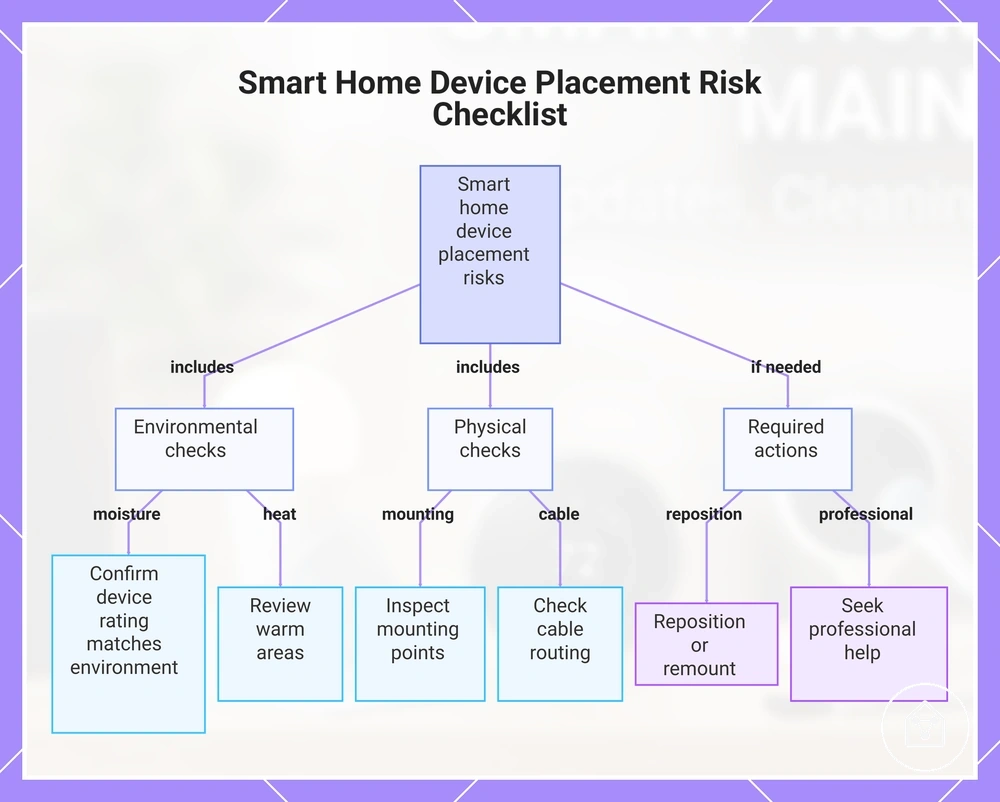
A smart home device placed in a humid area, near heat sources, or under cable stress can develop condition changes that affect reliability. Exposure risks depend on the device rating, placement, ventilation, and cable routing, so maintenance checks should focus on the actual environment around each device. Reviewing moisture, heat, mounting, and cable exposure conditions helps identify placement risks before they affect normal operation.
Each condition check connects a device location with an exposure type, a possible effect, and a suitable maintenance response.
Each condition check connects a device location with an exposure type, a possible effect, and a suitable maintenance response. For example, limited ventilation can increase heat around a device, while vibration or adhesive wear can weaken a mounting condition over time. If routine checks identify a condition that cannot be corrected safely through normal maintenance, repositioning, remounting, or professional electrical help may be required.
For example, limited ventilation can increase heat around a device, while vibration or adhesive wear can weaken a mounting condition over time.
The following checklist verifies common moisture, heat, mounting, and cable exposure conditions that can influence device condition and reliability.
- Moisture exposure: Check device locations for moisture conditions and confirm that the device rating matches the environment to reduce exposure risk.
- Heat and ventilation: Review warm areas and airflow conditions to identify heat buildup that may affect device condition.
- Mounting condition: Inspect adhesive, mounting points, and vibration exposure to identify stability risks that may require a placement review.
- Cable exposure: Check cable routing and cable stress conditions to identify wear risks that may affect connection reliability.
This chart shows the main environmental and physical exposure checks for smart home devices, along with required actions if unsafe conditions are found.
Battery, Power, and Connectivity Stability
Battery health, power delivery, and connection stability support smart home device reliability by helping maintain consistent device status and communication. A depleted battery, unstable adapter, loose plug, damaged cable, or weak signal can create similar offline alert symptoms in apps, but each condition requires a different maintenance check. Reviewing power and connectivity conditions helps identify routine maintenance needs before they affect normal device operation.
Reviewing power and connectivity conditions helps identify routine maintenance needs before they affect normal device operation.
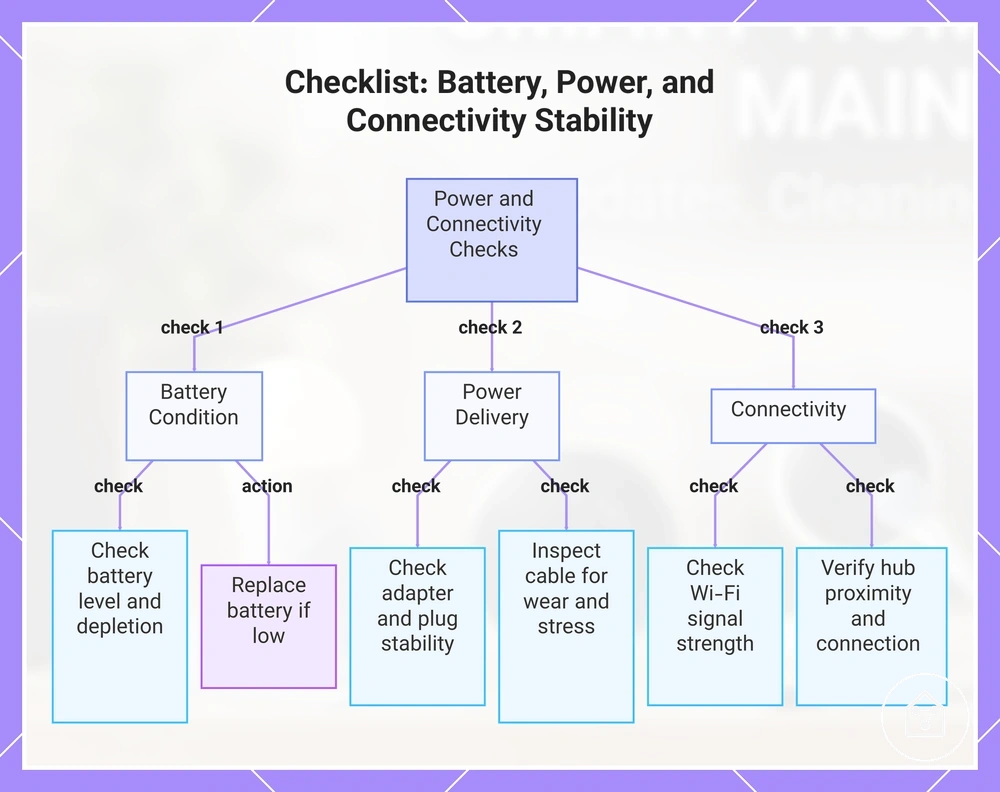
Power and connectivity checks should cover battery level, adapter condition, plug connection, cable state, Wi-Fi, hub connection, and signal strength. For example, a low battery level may require replacement, while a loose adapter or cable connection may require reseating before further troubleshooting. An offline alert can also result from cloud service issues, compatibility limits, or other conditions outside routine maintenance.
An offline alert can also result from cloud service issues, compatibility limits, or other conditions outside routine maintenance.
The following checklist verifies common battery, power, and connectivity stability conditions and their related maintenance actions.
- Battery health: Check battery level and depletion status to identify whether a low power condition requires battery replacement.
- Adapter and plug: Review adapter connection and plug stability to identify loose power delivery conditions that may interrupt operation.
- Cable condition: Inspect cable placement and visible wear to identify cable stress that may affect connection reliability.
- Wi-Fi and signal: Check connection stability and signal conditions to identify communication changes affecting device status.
- Hub connection: Review hub proximity and connection state to identify pairing or communication conditions requiring further checks.
This checklist groups the key battery, power delivery, and connectivity checks to maintain smart home device reliability.
Sensor Battery Life and Replacement Signals
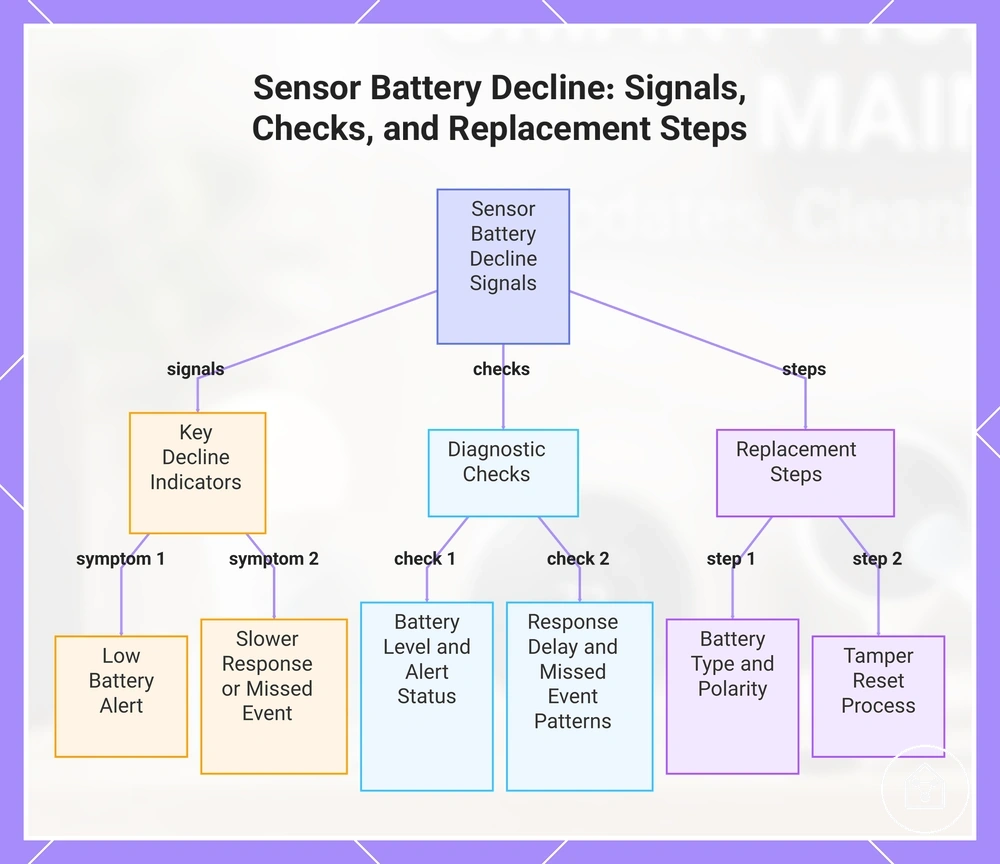
Sensor battery decline can be identified through signals such as a low battery alert, slower response, or missed event before normal operation is affected. Battery lifespan varies by sensor type, reporting frequency, environment, and battery chemistry, so replacement timing should follow device signals rather than a fixed period. Monitoring these replacement signals helps maintain sensor reliability through routine maintenance.
Monitoring these replacement signals helps maintain sensor reliability through routine maintenance.
Checking sensor battery condition involves reviewing battery level, alert status, response delay, and missed event patterns. For example, a sensor showing a low battery alert may require replacement review, while a delayed response may require checking battery condition alongside other possible causes. Always follow the manufacturer guidance for the correct battery type, polarity, and any tamper-reset process required after replacement.
- Battery level: Check the sensor battery level and low-voltage alert status to identify whether replacement timing should be considered.
- Low battery alert: Review alert notifications and battery condition signals to determine whether replacement action is needed.
- Response delay: Monitor delayed sensor responses and compare them with normal operation to identify possible battery decline.
- Missed event: Check missed events and battery status together to decide whether further monitoring or replacement review is required.
- Battery replacement: Confirm the correct battery type, polarity, and tamper reset guidance before completing a replacement action.
This chart shows the key signals that indicate sensor battery decline, the diagnostic checks to confirm, and the steps to replace the battery correctly.
Power Adapters, Plugs, Wi-Fi, and Hub Connections
A smart home device may show reliability issues when its power path or connection path has a weak, loose, or obstructed condition. Checking the power adapter, plug, cable, outlet, Wi-Fi signal, hub, and bridge helps identify simple maintenance conditions before they affect device status. These checks support stable device operation by keeping common power and connection points in suitable condition.
These checks support stable device operation by keeping common power and connection points in suitable condition.
Each maintenance check connects a power or connection point with its physical or signal condition and the possible reliability effect. For example, reseating a loose plug, organizing cables, checking hub position, or confirming device status can help identify common stability issues. If device behaviour remains affected after routine checks, the cause may require a separate troubleshooting process.
- Power adapter: Check adapter condition and connection stability to identify loose power delivery conditions that may interrupt device reliability.
- Plug and outlet: Review plug position and outlet condition to identify loose connections that may affect consistent operation.
- Cable: Inspect cable routing and visible stress points to identify cable conditions that may reduce connection stability.
- Wi-Fi signal: Check signal strength and possible obstructions to identify weak connection conditions affecting device status.
- Hub and bridge: Review hub or bridge position and connection state to identify communication conditions that may affect connected device reliability.
Routine Maintenance Frequency and Checklist Checks
Maintenance frequency depends on device role, location, battery use, firmware support, and usage intensity rather than a single schedule for every smart home device. A practical maintenance cadence uses monthly checks, seasonal checks, and event-triggered checks to review device condition, security, privacy settings, and energy efficiency. This approach helps users maintain reliability while adjusting routine reviews to the needs of each device group.
This approach helps users maintain reliability while adjusting routine reviews to the needs of each device group.
The following checklist organizes routine maintenance frequency and checklist checks by task, timing trigger, device group, and qualified next action. Use the table as a flexible review structure because device environment, support status, and usage patterns can change the appropriate maintenance timing.
| Item or condition | What to check | Why it matters | Qualified next action |
|---|---|---|---|
| Device status review | Check alerts, offline status, and unusual behaviour during monthly checks | Helps identify reliability changes before they affect normal device operation | Review the device condition and continue to troubleshooting only when routine checks do not explain the issue |
| Firmware support | Review firmware support and available update status during scheduled checks | Supports security and reliable operation when supported updates are available | Apply supported firmware changes according to manufacturer guidance |
| Physical condition | Review exposed device condition during seasonal checks or after environmental changes | Helps maintain reliability across different placement conditions | Complete suitable cleaning or condition checks based on the device type |
| Privacy settings | Review account and device privacy settings during routine reviews or after settings changes | Supports user control over device privacy preferences | Complete privacy settings maintenance checks when required |
| Energy efficiency | Review energy-related device behaviour during seasonal checks | Helps identify changes that may affect energy efficiency | Complete energy efficiency checks when reviewing usage patterns |
| Event-triggered checks | Review devices after battery alerts, power changes, unusual alerts, or environment changes | Connects maintenance action to a specific condition instead of a fixed schedule | Inspect the affected device area and determine whether further action is needed |
Monthly Device Testing and Status Reviews
Monthly device testing and status reviews confirm that smart home devices still respond, report, and alert correctly during routine use. A status review should check actual device behaviour rather than only the app display, because app status and device response can show different conditions. These checks help maintain reliability by identifying changes that need follow-up action.
These checks help maintain reliability by identifying changes that need follow-up action.
The following checklist verifies monthly testing conditions across device responses, status signals, battery level, automation triggers, and alert history. Use these reviews as a maintenance check while considering device model, support status, environment, and setup conditions.
- Device response: Test the device action and check the status signal for normal, delayed, or missing response conditions that may require follow-up action.
- Alerts: Review alert history and notification behaviour to check whether expected alerts appear or require further review.
- Automation trigger: Test automation trigger actions and confirm the related device response to identify changes in routine behaviour.
- Battery level: Check battery level information during monthly testing to identify low power conditions that may affect device performance.
- App status: Compare app status with actual device behaviour to identify differences that may require a status review.
Automation Response, Alerts, and Performance Drift
Automation response changes can appear gradually through lag, missed triggers, repeated alerts, or delayed routines during normal smart home use. A maintenance review should check response time, trigger accuracy, rule status, and notification behavior instead of assuming every change has the same cause. These checks help identify performance drift and determine an appropriate follow-up action.
These checks help identify performance drift and determine an appropriate follow-up action.
Performance drift may relate to battery condition, updates, network changes, privacy permissions, or device age, so the maintenance response should match the observed condition. For example, an automation with delayed routines may require checking device status and recent changes, while repeated alerts may require reviewing the related notification behavior before further escalation.
- Automation response: Check automation response time and routine behavior to identify normal, delayed, or inconsistent performance conditions.
- Alerts: Review alert history and notification behavior to identify repeated, missing, or unexpected alert conditions that need follow-up.
- Missed triggers: Test trigger actions and check event responses to identify missed events or inconsistent routine execution.
- Delayed routines: Monitor delayed routines and response timing to identify gradual performance drift that may require further review.
Reliability, Lifespan, and Update Support Limits
Reliability concerns should be assessed by separating normal maintenance needs from signs of aging, support limits, or declining value. A device with temporary issues linked to hardware condition, software support, battery availability, or environment may continue to provide value, while recurring failures can indicate that a replacement decision should be considered. Reviewing these conditions helps determine the appropriate next maintenance step.
Reviewing these conditions helps determine the appropriate next maintenance step.
Lifespan depends on hardware condition, software support, battery design, environment, and manufacturer policy, so no single lifespan value applies to every smart home device. The criteria below compare common maintenance signals, including device age, update support, failure frequency, compatibility, and repairability, to help distinguish temporary issues from recurring reliability decline.
| Item or condition | What to check | Why it matters | Qualified next action |
|---|---|---|---|
| Device age | Review device age and current hardware condition | Helps identify whether reliability changes relate to normal wear or declining hardware condition | Continue monitoring when performance remains suitable; review further options when reliability decreases |
| Update support | Check software support and available update status | Shows whether the device continues receiving supported software changes | Continue use with supported software or consider a replacement decision when support limits affect reliability |
| Failure frequency | Review how often issues occur after maintenance checks | Separates temporary maintenance needs from recurring reliability problems | Monitor occasional issues or evaluate repairability when failures become frequent |
| Battery availability | Check battery availability and replacement options | Supports continued operation for devices that rely on replaceable batteries | Replace supported batteries or consider alternatives when battery availability limits maintenance |
| Compatibility and repairability | Review compatibility with the existing setup and available repair options | Helps assess long-term reliability and overall device value | Compare continued maintenance needs with long-term value before making a replacement decision |
When Maintenance Becomes Troubleshooting or Replacement
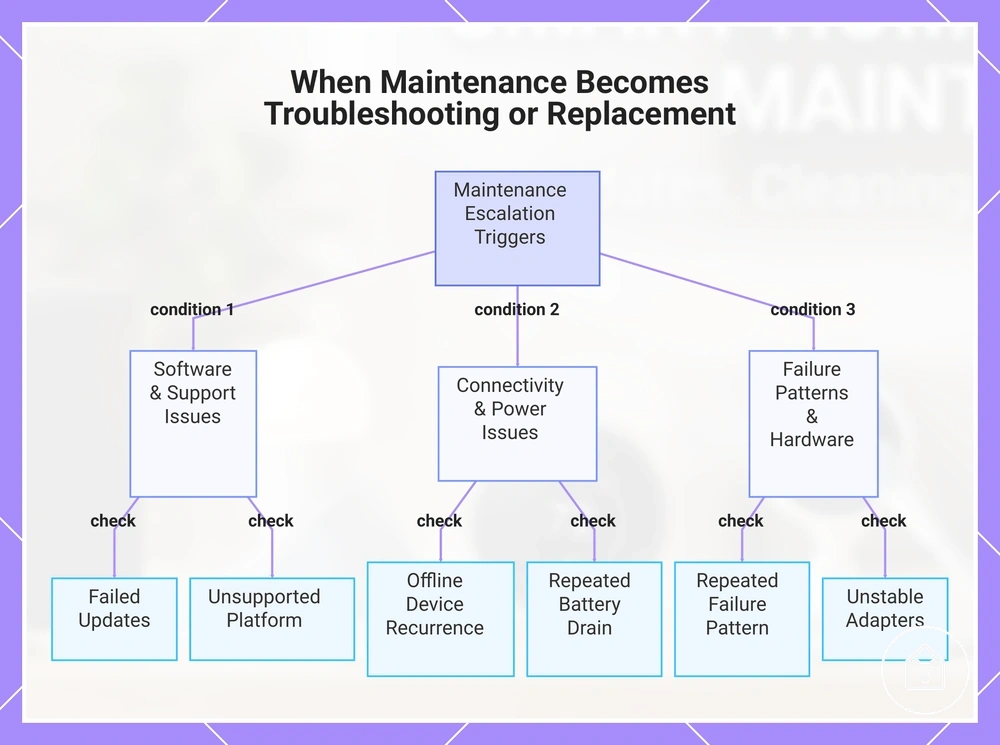
Troubleshooting or replacement becomes necessary when routine maintenance no longer resolves repeated failure patterns, safety concerns, support limits, or conditions that prevent reliable device use. A device may only need further checks when issues are temporary, but recurring problems can indicate a need for repair, replacement, or support. This boundary helps separate normal maintenance actions from escalation decisions.
This boundary helps separate normal maintenance actions from escalation decisions.
Escalation depends on the symptom, likely cause, test condition, and available outcome. For example, failed updates, offline devices, repeated battery drain, broken sensors, unstable adapters, or an unsupported platform may require different actions depending on the condition. Review troubleshooting smart home devices when routine maintenance checks do not explain the issue.
Escalation depends on the symptom, likely cause, test condition, and available outcome.
The following checklist verifies conditions that can indicate when maintenance should move toward troubleshooting, repair, replacement, or support.
- Repeated failure: Check whether the same failure pattern returns after maintenance actions to identify whether further diagnosis or replacement review is needed.
- Failed updates: Check update status and device behaviour after failed updates to determine whether software support or further troubleshooting is required.
- Offline devices: Check connection status and device response when offline devices continue appearing to identify whether escalation is needed.
- Battery drain: Check repeated battery drain conditions to determine whether battery replacement or device replacement should be considered.
- Unstable adapters: Check adapter condition and power stability when unstable adapters affect operation to determine whether repair or replacement is appropriate.
- Unsupported platform: Check support status when an unsupported platform affects device use to determine whether replacement or another supported option is required.
This chart categorizes the six key conditions to check that indicate when routine maintenance should escalate to troubleshooting, repair, replacement, or support.